
Now, let’s say only 1% of those 9.6 million people buy a product worth ₱500. That’s 96,000 orders and potential revenue of 48 million. This is a huge opportunity, right? If you’re still not selling on TikTok Shop, you could be missing out on customers who are ready to buy.
But getting started on a fast-growing platform like TikTok Shop can feel confusing, especially if you’re a new seller. How do you create a seller account? What are the seller fees? And once orders start coming in, how do you manage your inventory, shipping, and day-to-day operations?
This blog answers all of these questions. You’ll learn how to sell on TikTok Shop as a seller in the Philippines, understand the latest seller fees, and discover practical tips to manage your inventory and grow your business.
Why TikTok Shop is a great place to sell
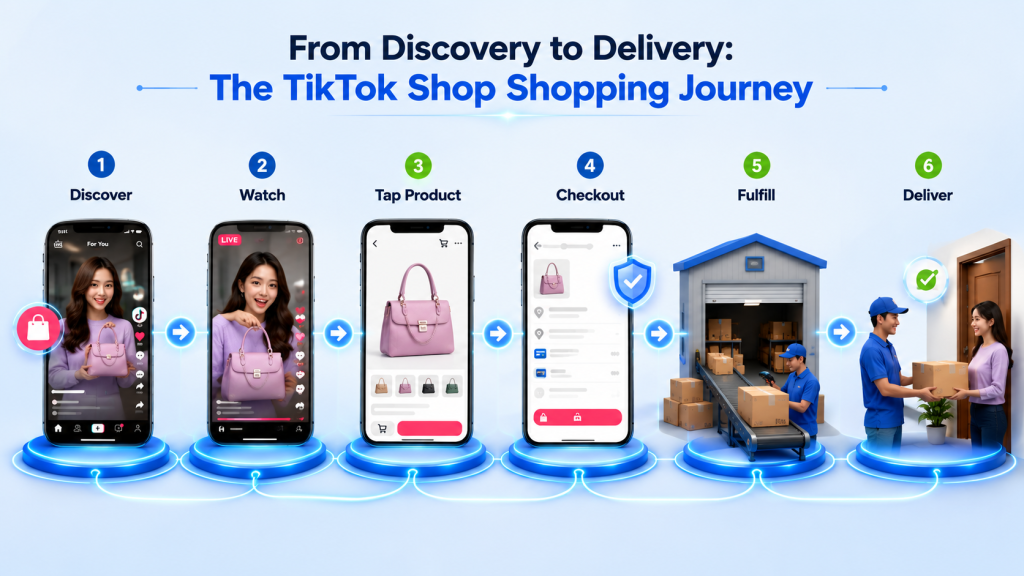
Shopping on TikTok is now as easy as watching a video or scrolling on your phone. Since its official launch in September 2023, TikTok Shop has allowed users to discover products, explore brands, and complete their purchases without leaving the app.
As the social commerce industry is projected to exceed US$1 trillion by 2028, TikTok Shop is expected to contribute a significant share of that growth. According to TikTok research, 83% of shoppers discovered a new product on TikTok Shop, while 70% discovered a new brand. This makes it one of the best places for businesses to sell their products in the coming years.
From discovering a product to completing a purchase with just a single tap, the entire shopping experience happens inside the app. This seamless buying journey is one of the biggest reasons why so many sellers are joining TikTok Shop. In fact, 90% of local sellers are MSMEs, independent brands, and homegrown businesses that have found the platform helpful because they can reach customers and generate sales faster than many traditional marketplaces or paid advertising channels.
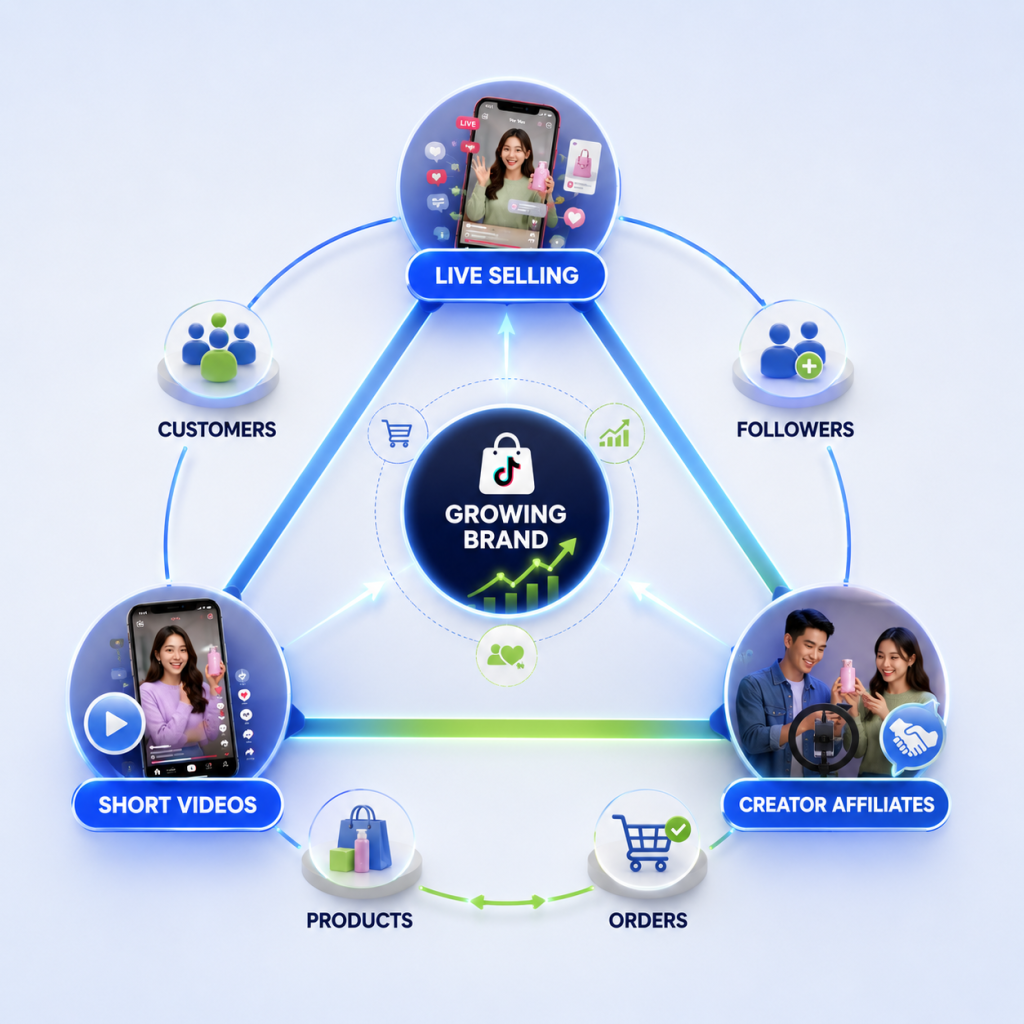
The platform offers three different ways to sell:
- Short Videos: Create engaging videos with product tags that appear in users’ feeds. Customers can tap the product, visit the product page, and complete their purchase in just a few clicks.
- Live Selling: Go live to demonstrate your products, answer customer questions, offer exclusive deals, and encourage buyers to place orders in real time.
- TikTok Shop Tab: Your dedicated storefront inside the app where customers can browse your complete product catalog, read reviews, and place orders directly.
If you are currently selling only on Lazada or Shopee, this is the right time to start selling on TikTok Shop as well. It can help you increase your organic reach, introduce your products to new customers, and generate sales through content. Instead of waiting for customers to search for your products, TikTok Shop helps your products appear in front of customers while they are already scrolling through content they enjoy.
Guide for creating your TikTok Shop seller account
Now that you know why selling on TikTok Shop is worth it, the next question is how to set up your TikTok Shop seller account. Here is what the process looks like.
Step 1: Go to the TikTok Shop Seller Center
Visit the TikTok shop seller registration page and click on Start Selling. You can sign up using your existing TikTok account or create a new account with your email address and phone number.
Fill in the required details, including:
- Your full name
- Region
- Contact information
- Type of products you plan to sell
Once everything is filled in, submit your application.
Step 2: Verify your identity and business
To activate your seller account, upload the required business documents, such as:
- Business license
- Government-issued ID
- Tax ID
- Bank account details
After uploading the documents, provide your shop information, including:
- Registered business name
- Business type
- Product category
TikTok usually takes one to two days to verify your identity. Once approved, you can proceed to the next step.
Step 3: Set up your shop to start selling
This is the most important step because it is the first thing customers will see. As the saying goes, “What looks good sells well.”
So, add your product information, including:
- Product name
- Product description
- Price
- Available quantity
- High-quality product images from different angles
Once your products are uploaded, TikTok will review your listings. The review process usually takes up to 24 hours. After approval, your products will be live and ready for customers to purchase.
But before you start selling, there’s one important question every seller should understand: What fees does TikTok Shop charge? Understanding these costs beforehand helps you price your products correctly and protect your profit margins. Here’s a breakdown of the charges you should know.
Before you sell, understand these TikTok Shop fees
If you’re wondering, “What are the latest TikTok Shop fees for sellers in 2026?”, here’s what you need to know. TikTok Shop charges several seller fees, including commission and transaction fees, that impact how much you earn from every sale. Understanding these charges upfront helps you price your products correctly, plan promotions, and avoid unexpected costs.
Here are the main fees you should know:
- Referral fee: 6% for most product categories. Some categories have lower fees, so check the TikTok Shop Seller Center for your specific category.
- Transaction or payment service fee: Up to 1% for select products.
- Registration fee: There is no monthly subscription or setup fee. Creating a TikTok Shop seller account is completely free.
Keep these charges in mind while planning your pricing, live selling discounts, or affiliate commissions, because a discount that attracts more customers can also reduce your profit if you have not considered platform fees, shipping charges, and other selling costs, especially for Cash on Delivery orders.
Once your pricing is planned, the next step is learning how to attract customers and generate sales on TikTok Shop. The platform offers three main selling methods, and understanding how each one works can help you reach more customers and increase your sales.
Best-selling methods every TikTok Shop seller should know to increase sales
Most sellers need a strategy that attracts, engages, and converts viewers into repeat customers. Posting consistently and using creative storytelling to connect with your audience can help you achieve this. So, what methods should you follow to sell more? Here are the most effective ones:
1. Use live selling to drive more purchases
Unlike a product image or a static listing, live sessions let customers see your product in action, ask questions instantly, and make purchase decisions without leaving the stream.
To get better results from live selling, keep these things in mind:
- Go live consistently: Sellers who go live regularly build trust with their audience and have more opportunities to generate sales.
- Create urgency: Offer limited-time discounts, live exclusive vouchers, or bundle deals during your session.
- Keep your inventory updated: If your inventory is not updated, you may oversell products, cancel orders, and receive negative reviews as you failed to deliver the product. Keeping your stock synced before every live session helps you avoid these problems.
2. Create short videos to increase product visibility
Every video you post gives your products another chance to appear on someone’s feed and attract buyers who may not know your brand yet.
Some content ideas include:
- Product demonstrations
- Tutorials
- Unboxing videos
- Before and after results
- Everyday use cases
3. Partner with creators to reach more customers
Creators recommend your products to their followers and earn a commission for every successful sale. Since they already have an engaged audience, their recommendations often feel more authentic, which helps your brand to introduce products to new customers.
Partnering with the right creators can help you:
- Reach a larger audience
- Build trust faster
- Increase product visibility
- Generate more sales without creating all the content yourself
These methods are used by many brands to increase their sales and improve their visibility on TikTok Shop. But once you start selling, there are some tips that are really useful to you, as they will help you throughout the selling process, and we have mentioned that below briefly.
6 ultimate tips every TikTok Shop seller must know to manage orders efficiently
Getting orders is exciting until they become difficult to manage. Suppose you are live on TikTok Shop during an 11.11 sale, and orders keep coming in every minute. Everything looks great until you realize the same product is also selling on Shopee and Lazada. Since your inventory is not updated in real time, you end up selling more products than you actually have in stock.
Now you have to cancel orders, disappoint customers, and deal with negative reviews. On top of that, every canceled order adds extra operational costs, from refund processing to shipping issues. It can also affect your seller ratings, making it harder to build customer trust.
So, how do successful TikTok Shop sellers avoid this problem? They keep inventory synced across all sales channels, so stock levels update automatically whenever a product is sold. During major sale events like 11.11, even a small inventory mismatch can lead to significant losses, but the right system helps prevent overselling and keeps your operations running smoothly.
This is where a system to prevent costly mistakes becomes essential, and keeps your business running smoothly as your sales grow.

To avoid these operational challenges, here are a few best practices every seller should follow:
1. Keep your inventory updated across all sales channels
If you sell on TikTok Shop, Shopee, Lazada, or your own website, every sale should automatically reduce your available stock across all platforms. Otherwise, you might accidentally sell the same product twice. This can lead to order cancellations, disappointed customers, and negative reviews. Using real-time inventory sync helps you keep stock levels accurate and prevents overselling.
2. Send orders to the right warehouse automatically
As your orders grow, checking each order manually and deciding which warehouse should fulfill it becomes time-consuming. Setting up automatic order routing ensures every order is sent to the nearest or most suitable warehouse without manual effort. This speeds up shipping, reduces processing errors, and helps customers receive their orders faster.
3. Keep track of COD and returned orders
Cash on Delivery (COD) orders and product returns are a normal part of running an online business. Regularly monitor which COD orders have been delivered, canceled, or returned. If a returned product is still in good condition, add it back to your inventory so it can be sold again. This keeps your stock count accurate and prevents unnecessary inventory losses.
4. Check your stock before every sale or live session
Before running a promotion or starting a TikTok Live, make sure you know exactly how many products are available for sale. Some items may already be reserved for customers who have placed orders but haven’t been shipped yet. Reviewing your inventory beforehand helps you avoid overselling and ensures you can fulfill every order you receive during the event.
5. Get your shipping process ready
A successful sale event can bring in hundreds of orders within a short time. Make sure you have enough packing materials, shipping labels, courier pickups, and warehouse staff ready before the sale begins. Being prepared helps you dispatch orders on time, reduces delays, and creates a better experience for your customers.
6. Keep your product listings updated
Your product listing is often the only information customers see before making a purchase. Always update product prices, stock availability, descriptions, specifications, and images whenever something changes. Accurate listings help customers make informed buying decisions, reduce confusion, and lower the chances of returns or complaints.
As your TikTok Shop business grows, so do your operational challenges. Instead of spending hours updating inventory, processing orders, and tracking returns manually, you can automate these tasks with an order management system and focus on growing your business.
And, if you are looking for an order management system that grows with your business, Unicommerce is a great choice. Here is why.
Make your operations on TikTok Shop seamless with Unicommerce
As you know, sellers in the Philippines face many operational challenges in their day-to-day business, especially during major sales events like 11.11, Back to School Sale, and other seasonal campaigns. Managing inventory, processing orders, handling returns, and keeping stock updated across multiple sales channels can quickly become overwhelming. This is where Unicommerce comes in.
Unicommerce is a SaaS based order and inventory management platform that helps you manage all these operations from one dashboard, so you can spend less time on manual work and more time growing your business.
So, why should marketplace sellers use Unicommerce? Because it offers:
- Offer 280+ integrations to simplify operations: Connect TikTok Shop, Shopee, Lazada, Shopify, courier partners like J&T Express, Ninja Van, and LBC, plus many other platforms, so that you can manage all your sales channels and shipping operations from one dashboard.
- Keep stock levels accurate everywhere: Whenever a product is sold on TikTok Shop or any connected marketplace, stock levels are updated automatically. This helps prevent overselling, keeps inventory accurate, and ensures customers see only available products.
- Handle orders without switching platforms: Collect orders from all your sales channels, automatically route them to the right warehouse, and generate shipping labels without logging into different seller panels. This speeds up fulfillment and reduces manual work.
- Manage returns and COD orders easily: Track returned products and COD orders from one place, while automatically restocking eligible inventory. This makes post-purchase operations easier to manage and helps keep your inventory records accurate.
- Track everything from one dashboard: Monitor pending orders, delayed shipments, inventory levels, and other important seller metrics from a single dashboard. With real-time insights, you can identify operational issues early and keep your business running smoothly, even during peak sales events.
The results speak for themselves. A leading beauty brand in the Philippines uses Unicommerce to manage more than 1,500 active SKUs across Lazada, Shopee, and Shopify while achieving a 99.99% order fulfillment rate and handling 800+ dispatches every month.
Apart from this, Unicommerce is trusted by 7000+ brands across countries and is built for sellers who want to grow on TikTok Shop without letting operations slow them down.
Managing orders across TikTok Shop, Shopee, and Lazada? See how Unicommerce helps sellers in the Philippines keep their inventory in sync, automate order processing, and simplify day-to-day operations. Book a demo today.
FAQs
1. How do I start selling on TikTok Shop in the Philippines?
To start selling on TikTok Shop, create a TikTok Shop seller account through the TikTok Shop Seller Center, complete your business verification, add your products, and wait for your listings to be approved. Once approved, you can start selling through short videos, live selling, and your TikTok Shop storefront.
2. Is a TikTok Shop seller account free?
Yes. Creating a TikTok Shop seller account is completely free. There are no registration or monthly subscription fees. However, TikTok charges referral and transaction fees on successful orders.
3. What documents do I need to create a TikTok Shop seller account?
The required documents usually include a government-issued ID, business registration details, tax information, and bank account details. The exact requirements may vary depending on your business type.
4. What is the best way to increase sales on TikTok Shop?
The best results usually come from combining live selling, short-form videos, and creator affiliates. Posting consistently, offering limited-time discounts, and keeping your product listings updated can also help increase your sales.
5. How much does TikTok Shop charge sellers in the Philippines?
TikTok Shop charges a referral fee on most product categories, along with a transaction or payment service fee. Since fees can vary by category, always check the latest fee structure in the TikTok Shop Seller Center before pricing your products.
6. Can I sell on TikTok Shop and Shopee at the same time?
Yes. Many businesses sell on TikTok Shop, Shopee, Lazada, and their own website at the same time. Using an inventory and order management system helps keep your inventory updated across all channels and reduces the risk of overselling.
7. How do I avoid overselling on TikTok Shop?
The easiest way to avoid overselling is by keeping your inventory synced across all sales channels in real time. This ensures your stock is updated automatically whenever an order is placed.
8. What products sell best on TikTok Shop?
Products that are easy to demonstrate usually perform well on TikTok Shop. Beauty products, fashion, home essentials, electronics accessories, kitchen products, and health and wellness items are some of the most popular categories.
9. How do I manage TikTok Shop orders more efficiently?
As your business grows, managing orders manually becomes difficult. Using an order management system helps you process orders faster, automate shipping, track returns, and manage inventory from one dashboard.
10. Do I need an inventory management system for TikTok Shop?
If you only receive a few orders every day, manual inventory management may work. But as your sales grow or you start selling on multiple marketplaces, an inventory management system helps prevent overselling, keeps stock updated, and makes your day-to-day operations much easier.
Written by
Sakshi Sinha
Content Strategist · Unicommerce
I’m an avid reader who genuinely believes a great blog can shift how you see the world — or at least how you run your warehouse. At Unicommerce, I turn complex e-commerce operations into stories that actually click. When my screen-weary eyes finally beg for mercy, I’m out chasing Coco, my wonderfully chaotic dog, around the park. Life’s too short for boring content — or boring walks.