
In India, peak season can bring order volumes that are nearly 3.5 times normal business levels. That means more orders, tighter dispatch deadlines, and more pressure on warehouse teams.
But can your warehouse handle 3.5X the usual volume with the same team?
As order volumes increase, many brands consider hiring more warehouse staff. But adding more people does not solve peak-season bottlenecks. Manual order processing can delay label generation, further slowing picking and dispatch. Packing can become slow and error-prone. Inventory can go out of sync across sales channels, which increases the risk of overselling. All this can also put your SLA at risk. A surge in returns can add even more pressure on the team.
In this blog, we break down the blind spots warehouse managers and operations heads face during sale periods and how an automated warehouse management system can help improve warehouse productivity.
Warehouse operational challenges brands face during peak sale season
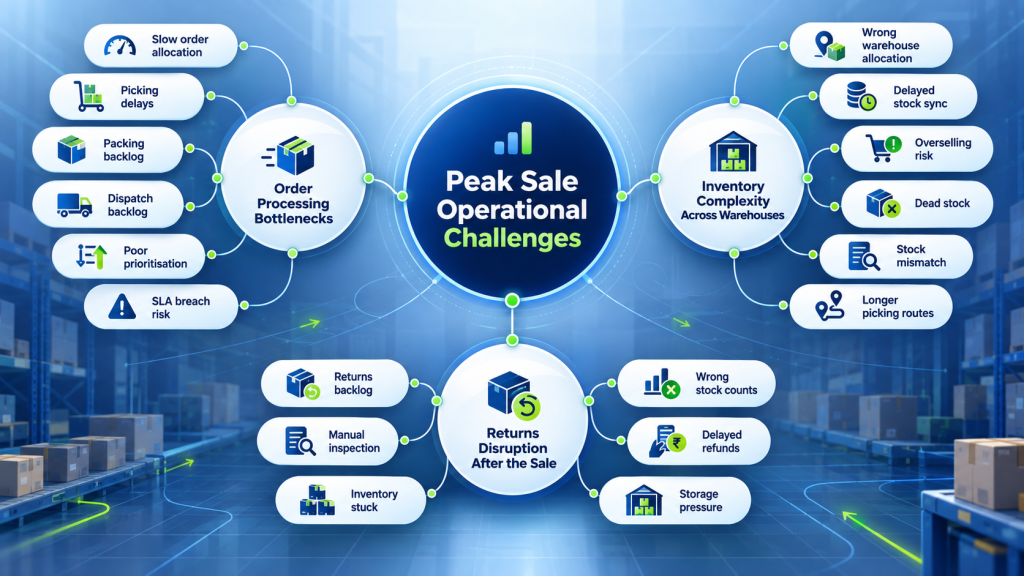
Peak-season pressure affects end-to-end warehouse efficiency. A delay in one stage can slow down all fulfillment stages for efficient warehouse management. Some of the core warehouse productivity challenges that come with a surge in order volume are:
1. Slow order processing can result in SLA breaches
During a sale, orders can come in faster than the warehouse can process them. Think of receiving 5,000 orders in a few hours, while the warehouse can process 1,000 per hour within the marketplace SLA.
- Stage 1. Order allocation: If orders are not assigned to the right warehouse quickly, picking cannot start, and the SLA clock keeps running.
- Stage 2. Picking: Teams may spend time finding SKUs, checking locations, and confirming quantities. These small delays can create hundreds of pending orders.
- Stage 3. Packing: Picked orders can pile up if labels are generated manually or in batches. Products are ready, but orders are still waiting for labels and dispatch.
- Stage 4. Dispatch: New orders keep coming in while older orders wait at picking, packing, or dispatch. As the backlog grows, teams have less time to clear orders before their SLA deadlines.
This becomes even harder when a sale pushes a warehouse from 2,000 to 10,000 orders in a day. The team has to manage thousands of picking, packing, and dispatch tasks within a limited time. With manual processing, creating pick lists, verifying SKUs, generating labels, and handling different order details can quickly become difficult. As volumes rise, teams spend more time on repetitive tasks and exceptions instead of processing orders.
2. Inventory management gets complicated across multiple warehouses
When a brand operates across multiple warehouses, the same SKU can be stored across locations while orders come from different marketplaces and the D2C website. During peak season, thousands of orders can come in together, making it harder to allocate each order to the right warehouse.
Inventory can also go out of sync when stock updates are delayed. A product sold on Amazon may still show as available on another channel, leading to overselling. At the same time, stock sitting in one warehouse may remain unavailable online because the system does not have the latest inventory count.
Multiple warehouses can also create:
- Wrong warehouse allocation: An order may go to a warehouse with less stock or lower capacity while another warehouse has enough inventory.
- Stockouts at the wrong location: A SKU may be out of stock in one warehouse while the same SKU is available at another.
- Dead stock: Slow-moving inventory can remain in one warehouse while another location runs short.
- Picking delays: Without exact inventory locations, teams spend more time searching for SKUs and confirming stock.
- Manual inventory adjustments: Teams may need to update stock levels after damage, returns, cancellations, or physical stock counts, which increases the risk of errors.
3. High return volumes can disrupt warehouse workflows
After a big sale, the warehouse may see a second wave of work when returns start coming in. A product comes back, but the process does not end at receiving the package. The team has to receive it, identify the order, check the returned item, verify its condition, and decide whether it can go back into sellable inventory.
When hundreds or thousands of returns arrive together, these checks can quickly create a separate backlog. This can lead to:
- Returns waiting for processing: Returned orders can pile up because the team cannot inspect every item immediately.
- Inventory getting stuck: Good products remain out of sellable stock until the return is processed and the inventory is updated.
- Wrong inventory counts: If returned items are not updated correctly, the system may show less or more available stock than the warehouse actually has.
- Delayed refunds: When return processing is pending, refund processing can also get delayed.
- Storage pressure: Unprocessed returns take up warehouse space and can get mixed with fresh inventory if they are not tracked properly.
These challenges come from the same core problem: manual warehouse processes cannot keep up with peak-season volumes. Sellers need a system that can help them to process bulk orders faster, keep inventory accurate across warehouses, manage returns without adding more manual work, and improve warehouse productivity.
And here, an automated WMS brings these processes together with features that help sellers manage these challenges at scale and improve warehouse productivity. Now, let’s look at how these capabilities help brands handle higher order volumes more efficiently.
How an automated warehouse management system can help to manage high order volume?
The challenges above usually start with one thing: too much manual work when order volumes go up. Unicommerce’s WMS brings inventory, order processing, picking, packing, dispatch, and returns into one connected workflow to increase warehouse productivity. Here is how it addresses each warehouse productivity bottleneck during a sale spike:
1. Keep inventory accurate with real-time inventory synchronisation
It syncs inventory across sales channels and warehouses in real time. When an order is placed on one channel, the available quantity is updated across connected channels. This keeps the stock shown on Amazon, Flipkart, D2C, and other channels aligned with the latest inventory position. For brands operating multiple warehouses, inventory visibility extends across locations.
This helps:
- Prevent the same stock from being sold across multiple channels
- Keep channel-wise inventory updated after every order
- Identify available stock across warehouses
- Reduce inventory mismatches caused by delayed updates
2. Process bulk orders faster with Blink Mode
Blink Mode consolidates multiple fulfilment steps into a single, continuous flow, reducing screen transitions and manual clicks. Teams can filter and group similar orders based on requirements such as SLA and process them together, instead of handling each order separately. It also automates tasks such as document generation and dispatch confirmation, helping shipments move faster towards courier handover. Blink Mode is particularly useful for SMB sellers and high-volume D2C brands that handle large order volumes, especially during peak sales.
This helps to:
- Reduce processing time and allow the team to handle more orders with the same headcount
- Reduce the perception of a “slow system,” improving user confidence and reducing frustration during peak sale periods
- Ensure shipments are ready for courier handover much faster with features like Quick Dispatch
- Reduce the chance of human error by automating document merging and skipping manual triggers
3. Reduce picking errors with barcode scanning
It integrates barcode scanning with handheld devices to verify the SKU and quantity during picking and packing. The warehouse operator scans the product barcode against the order details to confirm that the right item and quantity are being processed.
This helps to:
- Create a scan-based verification trail for each order
- Reduce dependency on memory and manual checks
- Make it easier to track where an order went wrong
4. Find inventory faster with bin- and shelf-level tracking
Native WMS tracks inventory at the bin and shelf level, showing teams where each SKU is stored. When a picker needs an item, the system shows the bin or shelf where it is stored. Instead of searching through aisles to locate a SKU, the picker can go directly to its recorded location.
This helps:
- Create pick lists with specific bin and shelf locations
- Reduce dependency on manual or Excel-based location searches
- Support FEFO-based picking at the bin level
- Track inventory movement during putaway and picking
- Improve visibility of inventory across different warehouse locations
5. Fulfil orders from the right warehouse with smart routing
Smart routing logic features consider inventory availability, warehouse capacity, and other routing rules when allocating orders. If the same SKU is available across multiple warehouses, the system checks the relevant routing conditions before allocating the order. This reduces the need for teams to manually check stock and decide the fulfilment location for every order.
This helps:
- Allocate orders based on available inventory and the nearest warehouse
- Consider warehouse capacity during allocation
- Distribute orders across multiple warehouses
6. Clear return backlogs faster with bulk returns processing
Bulk returns processing brings returns from multiple marketplaces into one dashboard and lets teams scan the AWB to pull up the related order and SKU details. Returned products can then be classified as good or bad inventory, with good inventory automatically added back to stock and bad inventory separated for further action. The system also tracks return aging and overdue returns so teams can monitor pending returns throughout the process.
This helps to:
- Reduce the number of pending returns during peak periods
- Improve visibility into return performance across channels
- Shorten the time between return receipt and inventory availability
- Prevent returned stock from remaining unaccounted for
- Help teams identify missing or delayed returns for follow-up
Several brands have seen measurable improvements in their warehouse operations management by using these features. For example, our client Powerhouse91 achieved 100% fulfilment and reduced SLA breaches by 89.88% by implementing the features discussed above.
Wrapping Up
So yes, you can increase warehouse productivity by up to 3.5 times without adding more manual labour. The key is to make your warehouse processes faster, more accurate, and better connected so your team can handle higher order volumes during peak season.
With our WMS solution, your team can automate repetitive tasks, keep inventory synced, process bulk orders faster, and reduce errors across picking, packing, dispatch, and returns to improve warehouse efficiency. This helps the same team handle higher order volumes without adding the same level of manual effort. And when the next sales spike comes in, your warehouse is better prepared to keep orders moving.

FAQs:
1. How to improve warehouse efficiency during peak season?
To improve warehouse efficiency during peak season, you have to automate repetitive tasks such as order processing, picking, packing, label generation, and inventory updates. Real-time inventory synchronisation, barcode scanning, bin-level tracking, and smart order routing can also help teams reduce errors and process orders faster during peak season.
2. What is the best software to improve warehouse productivity?
The best software to improve warehouse productivity is Unicommerce WMS. It helps brands automate warehouse processes, manage inventory across locations, process bulk orders faster, reduce picking errors, and improve fulfilment efficiency with features such as barcode scanning, bin-level tracking, smart routing, and bulk return processing. Trusted by 8,000+ brands since 2012, Unicommerce supports warehouse operations at scale for brands such as Dot & Key, Powerhouse91, Panda Box, and boAt.
3. How to manage high-volume e-commerce orders?
To manage high-volume e-commerce orders, you have to use a warehouse system that can handle bulk order processing and automate key fulfilment steps. Orders should be allocated quickly, picking and packing should follow standard workflows, and labels should be generated without unnecessary manual work. This helps teams keep orders moving even when volumes increase sharply.
4. How to prevent SLA breaches during peak order periods?
To prevent SLA breaches during peak order periods, you have to prioritise orders based on their dispatch deadlines and reduce delays at each fulfilment stage. Faster order allocation, automated label generation, barcode-based picking, and bulk order processing can help teams clear pending orders before marketplace cut-off times.
5. How to avoid inventory overselling during sales?
To avoid inventory overselling during sales, you need to keep inventory synced across all connected marketplaces, D2C websites, and warehouses. When an order is placed, the available stock should update across channels quickly. This gives teams better visibility into actual inventory and helps reduce overselling when multiple channels receive orders at the same time.
6. How to prevent SLA breaches during peak order periods?
To prevent SLA breaches during peak order periods, automate key fulfilment processes such as order processing, picking, packing, and label generation. Smart order routing can also help allocate orders to the right warehouse based on inventory and capacity. This helps teams process high order volumes faster and move orders through fulfilment within the required SLA timelines.
Written by
Sakshi Sinha
Content Strategist · Unicommerce
I’m an avid reader who genuinely believes a great blog can shift how you see the world or at least how you run your warehouse. At Unicommerce, I turn complex e-commerce operations into stories that actually click. When my screen-weary eyes finally beg for mercy, I’m out chasing Coco, my wonderfully chaotic dog, around the park. Life’s too short for boring content or boring walks.