
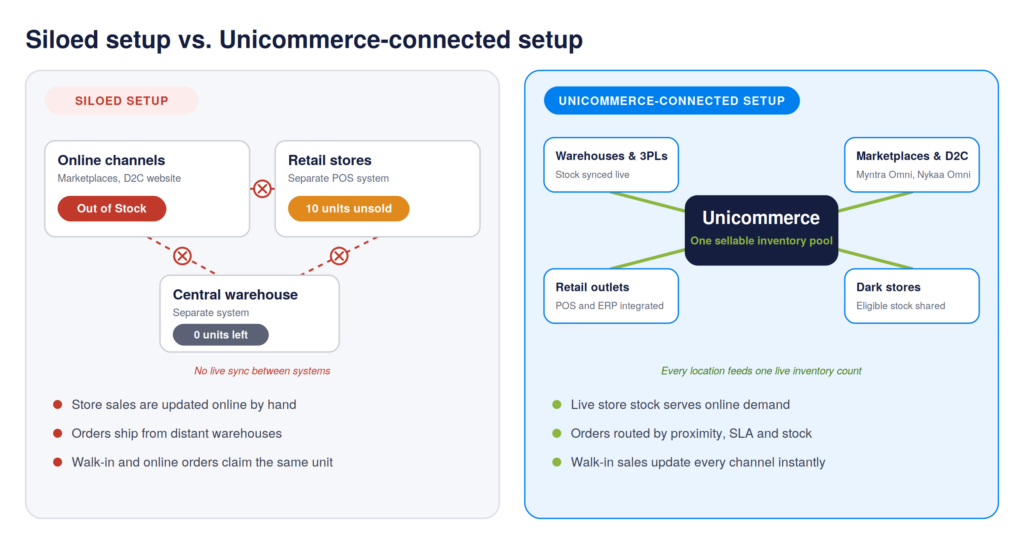
It’s the peak of the festive sale, and your bestselling SKU shows “Out of Stock” on Myntra. Shoppers move to a competitor, while ten units of the same product sit idle on a store shelf just three kilometres away. The warehouse has no stock to dispatch, and the store has inventory that online shoppers cannot access. Meanwhile, the sale continues, and the brand misses out on potential orders.
Brands decide their online and offline inventory split based on factors such as margin targets, channel priorities, and category demand. The challenge begins when orders start coming in, and the same inventory needs to serve multiple channels. When stores and online channels operate separately, the order management challenges become more complex. Stock remains unused at one location while another channel shows it as unavailable. Store sales may also fail to update online listings, leading to stock mismatches, delayed dispatches and lost revenue.
This blog looks at common fulfillment gaps between offline vs online inventory split and how Unicommerce’s order management system helps brands manage shared inventory, improve fulfillment, and prevent phantom stockouts.
What Is the Offline vs. Online Inventory Split?
The offline vs online inventory split refers to how a brand allocates its available stock between physical stores and online channels such as marketplaces, its D2C website and quick commerce platforms.
There is no fixed ratio for this allocation. A brand may reserve 60% of its inventory for stores and 40% for online orders, or use a different split based on its business needs. Factors such as store footprint, channel mix, SKU-level sales, regional demand, product category, and growth plans influence this decision.
The challenge begins when both channels manage their inventory through separate systems.
What Happens When Online and Offline Inventory Allocation Work in Silos?
When physical stores, warehouses, and online channels operate on separate systems, brands face challenges beyond inventory visibility. These gaps affect how stock is allocated, how orders are fulfilled, how returns are tracked, and how financial records are maintained.
Here are five common operational challenges brands face when their online vs offline inventory management do not work together.
1. Online Stockouts Occur While Store Inventory Remains Unsold
- The operational challenge: Brands struggle to make store inventory available to online sales channels. As a result, products appear out of stock on marketplaces and D2C websites even when sufficient stock is available in physical stores.
- Why it happens: Physical stores and e-commerce warehouses maintain separate inventory pools. Marketplaces and D2C websites only reflect stock allocated to online fulfilment, while inventory reserved for physical stores remains unavailable for online orders. This creates stockouts on digital channels despite inventory being available elsewhere in the retail network.
The business impact:
- Lost sales: Customers move to competing brands when products appear unavailable online.
- Lower order fill rates: Brands cannot fulfil online demand using stock held in physical stores.
- Higher inventory holding costs: Unsold products occupy store space and tie up working capital.
2. Walk-in and Online Customers End Up Buying the Same Product
- The operational challenge: Brands struggle to prevent overselling when store POS systems and online sales channels do not synchronise inventory in real time. This creates a risk of allocating the same product to both walk-in and online customers, resulting in stock mismatches and order cancellations.
- Why it happens: Store POS systems and online marketplaces operate on separate inventory records. When a product is sold at a physical store, the updated stock quantity does not immediately reflect across online channels. This delay allows online orders to be placed against inventory that has already been sold.
The business impact:
- Order cancellations: The brand must cancel an order because the product is unavailable.
- Marketplace penalties: Repeated cancellations can affect seller performance and attract penalties under applicable marketplace policies.
- Customer dissatisfaction: Customers receive cancellation notifications after successfully placing their orders.
3. Orders Ship from Distant Warehouses Despite Nearby Store Availability
- The operational challenge: Brands struggle to assign online orders to the nearest eligible fulfilment location because their order management systems cannot access store-level inventory and location data. As a result, orders are allocated to distant warehouses even when nearby stores have the required stock.
- Why it happens: When store inventory is not connected to the order management system, it cannot consider nearby retail stores as fulfilment locations. Instead, orders are assigned to warehouses based on available stock. For instance, an order placed by a customer in Mumbai may be dispatched from a Delhi warehouse even when the same product is available at a retail store in Bandra.
The business impact:
- Higher shipping costs: Long-distance shipments increase courier expenses per order.
- Longer delivery TAT: Customers wait longer for orders that could have been fulfilled locally.
- Lower profit margins: Additional freight expenses reduce the profitability of individual orders.
4. Returned Products Go Missing Across Stores and Warehouses
- The operational challenge: When returns are handled across multiple stores, warehouses and online channels, brands struggle to match returned quantities with the original orders and inventory records. This creates gaps in tracking missing, damaged or unaccounted stock and delays its reconciliation.
- Why it happens: Return-to-Origin (RTO) and Customer-Initiated Returns (CIR) move through different courier networks and fulfilment locations. When courier tracking, return records and warehouse inwarding data remain in separate systems, teams cannot easily verify the receipt and condition of each returned product.
The business impact:
- Inventory leakage: Missing or unaccounted products create losses during reverse logistics.
- Missed recovery claims: Delayed identification of missing or damaged stock can cause brands to miss marketplace claim deadlines.
- Delayed resale: Returned products remain unavailable for sale until their receipt and condition are verified.
5. Sales and Inventory Records Do Not Match Financial Accounts
- The operational challenge: Brands struggle to match the sales made through physical stores and online channels with the payments received and inventory sold. This creates discrepancies in financial records and makes it difficult for finance teams to calculate accurate revenue, returns, and taxes.
- Why it happens: A product sold through a physical store is recorded in the POS system, while an online sale is recorded on the marketplace or D2C platform. When these systems are not connected to the ERP, sales, returns, and tax details must be transferred manually. Missing transactions, duplicate entries, or incorrect amounts can then create differences between sales reports, inventory records, and financial accounts.
The business impact:
- Delayed financial closing: Finance teams spend additional time identifying and correcting transaction discrepancies.
- GST compliance risks: Incorrect CGST, SGST, or IGST entries can create tax reconciliation mismatches.
- Inaccurate financial reporting: Unmatched transactions affect the accuracy of revenue reporting and inventory valuation.
To know more about Inventory mismatch and its impact, read this blog
To overcome these challenges, brands need better coordination between their physical stores, warehouses, and online sales channels. Connected inventory and order management systems help maintain accurate stock visibility, improve order allocation, track returns, and keep operational records aligned across locations.
How Unicommerce’s Omnichannel Inventory Management Helps Brands Fulfill Better
Unicommerce’s Omnichannel inventory management software connects every stock location, from central warehouses and 3PL facilities to dark stores and physical retail outlets, into one sellable inventory pool across all sales channels. This gives brands a unified view of inventory and helps them fulfil orders using available stock across locations.
1. Unified Inventory Visibility Across Stores and Online Channels
It provides centralised inventory visibility across 12,300+ stores and warehouses. Through integrations with leading POS and ERP systems such as Ginesys, Wondersoft, GoFrugal, QueueBuster, and Logic ERP, store-level stock flows into Uniware.
This allows brands to make eligible store inventory available across digital channels. Slow-moving stock that would otherwise remain on store shelves can help fulfil online demand while inventory buffers protect stock reserved for walk-in customers.
2. Intelligent Order Routing
When an online order is placed across any of the 145+ integrated sales channels, Uniware’s smart allocation engine evaluates the order based on:
- Customer Proximity: Matches the customer’s delivery pincode with nearby stores or warehouses that hold the required SKU.
- Stock Availability: Checks available inventory at each fulfilment location before assigning the order.
- SLA Timelines: Prioritises locations that can meet the promised delivery timelines.
This helps brands reduce long-distance shipments, lower shipping costs, and improve delivery turnaround time.
3. Order Hopping
When an online order is assigned to a physical store, store staff can accept or reject it based on stock availability and their ability to fulfil it.
If the store rejects the order or does not acknowledge it within the configured SLA window, Uniware automatically moves the order to the next eligible store or warehouse. This reduces manual reassignment and helps prevent delays in order fulfilment.
4. Ship-from-Store and Click & Collect
It helps physical retail stores fulfil online orders without disrupting regular store operations.
- Store Fulfilment: Store staff can pick, pack and dispatch online orders through supported web or POS interfaces.
- Marketplace Omni Programs: Native integrations with Myntra Omni and Nykaa Omni allow eligible physical stores to fulfil marketplace orders.
- Click & Collect: Supports store pickup workflows where customers can collect their online orders from a selected retail store.
5. Real-Time Inventory Synchronization to Prevent Overselling
It maintains a connection between store POS systems and online sales channels to keep inventory updated across locations.
- When a walk-in customer purchases the last available unit at a physical store, the POS transaction updates inventory in Uniware.
- Uniware then updates the available stock across connected digital storefronts such as Shopify, Amazon, Myntra, and Flipkart.
This helps prevent double inventory allocation, reduces stock mismatches, and avoids order cancellations when the same inventory serves both online and offline customers.
How Are Brands Managing Omnichannel Operations with Unicommerce?
Brands across fashion, lifestyle and retail use our omnichannel inventory management software to connect their physical stores, warehouses and online sales channels. Here are some brands that have improved inventory visibility, order allocation, and fulfillment across their omnichannel operations using Uniware.
1. The House of Rare – A Premium Apparel Brand
Challenge: The House of Rare wanted to bring its online and offline operations onto one platform. Its existing system had limited ERP integration with Ginesys and poor inventory synchronization across 51 stores and fulfilment centres. This led to unfulfillable orders and limited visibility across channels.
What they implemented: The brand integrated its Ginesys ERP with Uniware to sync store-wise inventory across 51 stores. It also configured proximity-based order allocation and automated order hopping to route orders to nearby stores. Integrations with Shopify and marketplaces such as Flipkart, Myntra, Nykaa Fashion, and Tata CLiQ brought its sales channels onto one platform.
Results:
- 9X sales order growth.
- Managed 51 stores and 4 warehouses across 8 sales channels.
- 34% reduction in order returns.
- Average dispatch time of 12 hours.
- 178K+ orders dispatched per month.
2. Chumbak – A Home Décor and Lifestyle Brand
Challenge: Chumbak faced inventory visibility gaps across its online and offline channels. Its customised Microsoft AX ERP was difficult to integrate, while delayed order processing and manual warehouse operations affected fulfilment.
What they implemented: Chumbak integrated its Microsoft AX ERP with our software and connected inventory across 58+ retail stores and one warehouse. It also adopted automated order hopping, which allowed store staff to accept or reject orders. If a store could not fulfill an item, the order would be moved to another store or the warehouse.
Results:
- Achieved a 99.99%+ order fulfilment rate.
- Managed 58+ stores and 1 warehouse through one platform.
- Dispatched 64K+ orders per month.
- Managed 13 sales channels with a centralised inventory view.
Conclusion
Whatever offline vs. online inventory split a brand chooses, connected inventory and smart order routing determine how efficiently it fulfils orders. When store stock, warehouse stock, and online demand come together in one sellable inventory pool, store sales update every channel, orders reach the nearest eligible location, and rejected orders move to the next available location without manual intervention.
Unicommerce’s omnichannel inventory management across channels brings these capabilities together for brands selling through physical stores, marketplaces and their own websites.
FAQs
1. How should brands split inventory between online and offline channels?
Brands should split inventory between online and offline channels based on channel-wise demand, SKU-level sales, store performance, product category, regional demand and growth plans. There is no fixed ratio that works for every business. A brand may allocate 60% of its inventory to stores and 40% to online orders, or use a different ratio based on its business requirements. Brands should also account for safety stock and ensure that available inventory can serve demand across channels.
2. What is the difference between online and offline inventory management?
Online inventory management focuses on tracking and fulfilling orders received through marketplaces, D2C websites and quick commerce platforms. Offline inventory management focuses on stock available at physical retail stores for walk-in customers. When these channels operate separately, brands struggle with stock visibility, inventory mismatches, and order fulfilment. Omnichannel inventory management connects both operations to provide a centralised view of stock across stores and warehouses.
3. How can brands prevent online stockouts when physical stores have available inventory?
Brands can prevent online stockouts by connecting store-level inventory with their online sales channels. When warehouse stock runs out, an order management system can identify eligible inventory at nearby retail stores and make it available for online fulfillment. This allows brands to use existing store stock to serve online demand instead of displaying products as out of stock while inventory remains unused at physical locations.
4. Can physical store inventory be used to fulfil online orders?
Yes, brands can use physical store inventory to fulfil online orders through ship-from-store workflows. An order management system connects store stock with marketplaces and D2C websites, allowing eligible stores to receive online orders. Store staff can accept the assigned order, pick and pack the product, and dispatch it to the customer. Brands can also use click-and-collect workflows to let customers collect online orders from selected retail stores.
5. How does omnichannel inventory management improve inventory allocation?
Omnichannel inventory management improves inventory allocation by providing centralised stock visibility across warehouses, physical stores and online sales channels. Brands can identify available inventory across locations, reduce the need for separate stock buffers, and use eligible store inventory to fulfil online demand. Order routing based on stock availability, customer proximity and delivery timelines also helps brands utilise inventory more efficiently.
6. How can brands rebalance inventory between online channels and physical stores?
Brands can rebalance inventory by tracking stock availability and demand across stores, warehouses and online channels. When a product has low demand at a physical store but higher demand online, eligible store inventory can help fulfil online orders. Similarly, brands can use SKU-level sales, regional demand and store performance to review their allocation decisions. A centralised inventory management system helps teams identify available stock across locations and make better fulfilment decisions.
7. How can brands avoid overselling inventory across multiple sales channels?
Brands can avoid overselling by connecting their POS systems, warehouses and online sales channels through a centralised inventory management system. When a walk-in customer purchases a product, the POS transaction updates inventory in the central system. The updated stock availability is then synced with connected channels such as Shopify, Amazon, Myntra and Flipkart. This reduces the risk of two customers placing orders for the same available unit and helps prevent cancellations caused by delayed stock updates.
8. How should brands manage inventory during festive sales and seasonal demand spikes?
Brands should monitor SKU-level demand, regional sales trends and stock availability across stores and warehouses during festive sales and seasonal demand spikes. They should avoid relying only on fixed inventory allocations because demand can shift between online and offline channels. Connecting store and warehouse inventory helps brands use available stock across locations when a particular fulfilment centre runs out. Automated inventory updates and order routing also reduce manual stock adjustments and dispatch delays during peak sales events.
9. Which KPIs should brands track to measure inventory allocation performance?
Brands should track inventory and fulfillment metrics that show how efficiently stock moves across online and offline channels. Some useful KPIs include:
- Inventory utilisation: Measures how effectively available stock is used across stores and warehouses.
- Stockout rate: Tracks how often products become unavailable despite demand.
- Order cancellation rate: Helps identify cancellations caused by inventory mismatches or unavailable stock.
- Order fulfilment rate: Measures the percentage of orders successfully fulfilled.
- Average dispatch time: Tracks how quickly orders move from allocation to dispatch.
- Shipping costs: Help evaluate whether orders are fulfilled from cost-effective locations.
- Store inventory sell-through: Shows how effectively physical store stock is sold or used for fulfilment.
Tracking these metrics helps brands identify inventory gaps, improve stock utilisation and reduce fulfilment inefficiencies.
10. How can Unicommerce help brands manage inventory across online and offline channels?
Unicommerce connects physical stores, central warehouses and 3PL facilities through Uniware to provide centralised inventory visibility across sales channels. It integrates with POS and ERP systems such as Ginesys, Wondersoft, GoFrugal, QueueBuster, and Logic ERP to bring store-level stock into the central inventory system. Its smart allocation engine considers customer proximity, stock availability and delivery timelines to assign orders to eligible fulfilment locations. Order hopping automatically moves orders to another eligible store or warehouse if the assigned store rejects an order or does not acknowledge it within the configured SLA. Unicommerce also supports ship-from-store, click-and-collect and real-time inventory synchronisation to help brands manage online and offline fulfilment through one platform.
Written by
Sakshi Sinha
Content Strategist · Unicommerce
I’m an avid reader who genuinely believes a great blog can shift how you see the world or at least how you run your warehouse. At Unicommerce, I turn complex e-commerce operations into stories that actually click. When my screen-weary eyes finally beg for mercy, I’m out chasing Coco, my wonderfully chaotic dog, around the park. Life’s too short for boring content or boring walks.