
Launching an ecommerce website doesn’t have to take months. With Shopify, first-time D2C founders can set up a store, add products, configure payments and shipping, and launch without extensive technical development. Here’s how to skip that and go live in a week with Shopify! It brings everything into one place, making it easy for D2C brands to launch and manage an online store.
Shopify has a growing presence in India, with 127,677 live stores recorded as of August 7, 2026. According to Store Leads, the number of Shopify stores in India grew 16% year over year in Q2 2026, with Apparel, Home & Garden, and Beauty & Fitness among the largest categories. With Shopify adoption growing among Indian ecommerce businesses, understanding how Shopify works in India is essential for founders who want to launch quickly while getting payments, GST, shipping, COD, and operations right from the beginning.
But the real question is how to use Shopify to bring out the best because to overcome challenges like COD, UPI payments, and logistics, you need the right setup, not just a website. So, let’s explore everything in this blog, from how to use Shopify in India step by step, from Shopify store setup to payments, pricing, and scaling.
Shopify in India at a Glance
| Factor | What Indian Sellers Need to Know |
|---|---|
| Availability | Shopify is available to businesses in India and can be used to create and manage an online store. |
| Shopify Payments | Shopify Payments is currently not available to India-based merchants, so businesses generally need to use supported third-party payment providers. |
| Payment Gateways | Indian sellers can integrate supported payment providers such as Razorpay, Cashfree, and PayU, depending on availability and business requirements. |
| UPI Payments | UPI can be offered through supported third-party payment providers, giving customers familiar Indian payment options at checkout. |
| Cash on Delivery (COD) | COD can be offered through Shopify’s available payment and app integrations, with additional tools available for COD verification and fraud prevention. |
| Shipping & Delivery | Shopify stores can connect with shipping and fulfillment providers to manage shipping rates, courier selection, tracking, and delivery. |
| Domain | Sellers can connect a custom domain such as .com, .in, or .co.in to build a branded online store. |
| GST & Taxes | GST registration and tax requirements depend on the seller’s business structure, turnover, products, and applicable Indian tax rules. Shopify provides tax settings, but sellers remain responsible for tax compliance. |
| Dropshipping | Shopify can support dropshipping through compatible apps and supplier integrations, allowing sellers to operate without holding all inventory themselves. |
| Marketplace Selling | Shopify can be used alongside marketplaces and other sales channels through supported integrations, helping brands manage multiple selling channels. |
| Inventory Management | Shopify provides inventory management features, while growing brands with multiple warehouses or sales channels may benefit from dedicated inventory or order management software. |
| Best For | D2C brands, retailers, niche product businesses, marketplace sellers building their own website, and growing ecommerce businesses. |
In simple terms, how Shopify works in India is similar to how it works globally: Shopify provides the storefront and core ecommerce infrastructure, while Indian businesses typically connect third-party payment, shipping, tax, and operational tools to meet local requirements. This makes Shopify relatively easy to launch while giving growing brands flexibility to build a larger ecommerce technology stack as their operations become more complex.
What Makes Shopify Ideal for India?
If you’re wondering, “does Shopify work in India?”, the answer is yes. Understanding how Shopify works in India is important because the country’s ecommerce ecosystem is fast-growing but also complex. From diverse payment preferences to logistics challenges and high return rates, businesses need a platform that can handle real-world operational demands without adding technical burden.
That’s exactly why many brands asking “does Shopify work in India?” and exploring how to use Shopify in India choose it as their starting point.
India’s Ecommerce Reality
Running an online store in India is very different from global markets. Businesses need to manage:
1. High dependency on COD (Cash on Delivery):
A significant portion of orders in India still comes via COD, which increases return (RTO) risks and requires additional verification workflows.
2. Multiple payment methods:
Customers expect flexibility with UPI, wallets, cards, and net banking. A limited checkout experience can directly impact conversions.
3. Logistics complexity across PIN codes:
Delivering across metros, Tier 2, and Tier 3 cities involves multiple courier partners, serviceability checks, and variable delivery timelines.
4. High return rates (RTO challenges):
Returns, failed deliveries, and exchanges are more frequent, making post-order operations critical for profitability.
How Does Shopify Work in India?
Shopify works in India by bringing your online storefront, product catalog, orders, payments, inventory, and fulfillment workflows together in one ecommerce platform. However, Indian businesses typically connect Shopify with third-party payment gateways, shipping providers, and other apps to support local requirements such as UPI, COD, GST, RTO management, and multi-channel selling.
The basic Shopify order flow looks like this:
Customer → Shopify Store → Payment Gateway → Order Processing → Inventory → Fulfillment → Shipping → Delivery → Returns/RTO
Here’s how the process works step by step:
1. Customer Visits Your Shopify Store
A customer visits your Shopify-powered website through search, social media, advertisements, marketplaces, or a direct link. They browse your product categories and product pages before selecting an item.
2. Customer Selects a Product
The customer views the product details, including images, price, description, available variants, offers, and stock availability, and chooses the product they want to purchase.
3. Product Is Added to Cart
The selected product is added to the shopping cart. Shopify calculates the order value and applies applicable discounts, shipping charges, and other checkout settings.
4. Customer Chooses a Payment Method
At checkout, customers can select an available payment option based on the payment providers connected to the store. For Indian customers, common options include:
- UPI
- Credit and debit cards
- Net banking
- Wallets
- Cash on Delivery (COD)
5. Payment Gateway Processes the Payment
For online payments, the connected payment gateway processes the transaction and communicates the payment status to the Shopify store.
For example, an Indian seller may use a supported provider such as Razorpay, Cashfree, or PayU, depending on eligibility and business requirements.
6. Shopify Creates the Order
Once the customer completes checkout, Shopify records the order in the admin dashboard. The seller can view details such as the customer’s information, products ordered, payment status, shipping address, and fulfillment status.
7. Inventory Is Updated
Shopify updates inventory based on the order and the inventory settings configured for the store. This helps sellers track available stock and identify products that need replenishment. For businesses selling through multiple channels or warehouses, additional inventory or order management software may be required to keep stock synchronized across locations and channels.
8. Order Is Routed for Fulfillment
The order is then prepared for fulfillment. Depending on the business setup, this may involve the seller’s own warehouse, a third-party fulfillment provider, or another logistics partner.
9. Courier Picks Up the Package
Once the order is packed and ready to ship, it can be handed over to the selected courier or shipping provider. Shipping integrations can help automate courier selection, shipping labels, tracking, and fulfillment workflows.
10. Customer Receives Tracking Updates
The customer can receive shipping and delivery updates through the store’s configured communication or tracking tools. This helps customers monitor their order from dispatch to delivery.
11. Returns, Exchanges, or RTO Are Managed
After delivery, the order may be completed, returned, exchanged, or marked as Return to Origin (RTO) if delivery fails.
For Indian ecommerce businesses, this stage is particularly important because COD orders, failed deliveries, and returns can significantly affect fulfillment costs and margins. Sellers can use Shopify apps and connected logistics/operations tools to manage these workflows more efficiently.
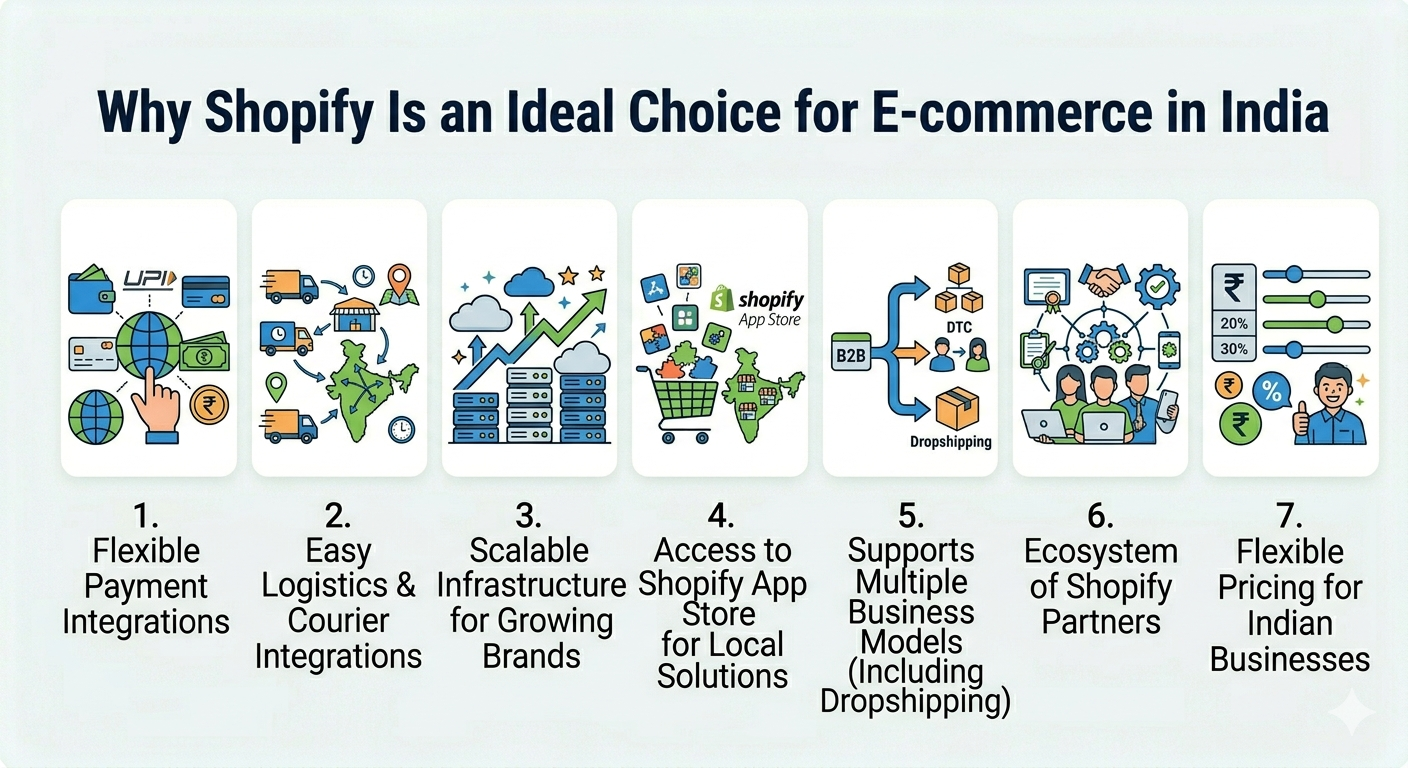
Why Shopify Is an Ideal Choice for E-commerce in India
Shopify stands out because it helps you operate efficiently within India’s unique ecosystem. But how does Shopify work in India? It connects your storefront with product management, payments, shipping, apps, and order management, allowing you to manage your ecommerce operations from one platform.
1. Flexible Payment Integrations
While native Shopify payments have limitations in India, Indian merchants can use supported third-party payment providers to accept online payments. Available providers and payment methods depend on the merchant’s location, eligibility, business requirements, and Shopify’s current supported-provider list.
This allows you to:
- Accept UPI, wallets, cards, and COD
- Offer multiple payment options at checkout
- Improve conversion rates across customer segments
2. Easy Logistics & Courier Integrations
Shipping in India requires adaptability and Shopify supports that through integrations.
You can connect with:
- Aggregators like Shiprocket
- Courier partners like Delhivery, Blue Dart, Ecom Express
This enables:
- Real-time shipping rate calculation
- Automated order fulfillment
- Tracking and delivery updates
3. Scalable Infrastructure for Growing Brands
Whether you’re processing 10 orders or 10,000, Shopify’s infrastructure can handle growth without performance issues.
As your business scales, you can:
- Upgrade shopify plans based on your needs
- Add more staff accounts and automation
- Handle high traffic during sales or campaigns
4. Access to Shopify App Store for Local Solutions
The shopify app store is one of the biggest advantages for Indian sellers.
You can install apps for:
- COD confirmation & fraud prevention
- Order tracking and customer notifications
- Inventory and warehouse management
- Marketing automation
5. Supports Multiple Business Models (Including Dropshipping)
Shopify is flexible enough to support different ecommerce models in India:
- Inventory-led brands
- Marketplace-first sellers building their own website
- Shopify dropshipping businesses
With dropshipping apps, you can:
- Source products without holding inventory
- Automate order fulfillment
- Start with low investment
6. Ecosystem of Shopify Partners
As your business grows, you may need expert support.
Shopify partners in India can help with:
- Store design and development
- Custom integrations
- SEO and performance marketing
- Conversion rate optimization
7. Flexible Pricing for Indian Businesses
One of the reasons Shopify works well in India is its scalable pricing.
With different Shopify plans, you can:
- Start small with minimal investment
- Upgrade as your revenue grows
- Access advanced features only when needed
Step-by-Step Shopify Store Setup in India
If you’re learning how to use Shopify in India, the good news is that the platform simplifies what would otherwise be a complex process. From creating your store to launching it live, every step is structured and beginner-friendly making it ideal for shopify for beginners as well as growing brands.
Let’s break down the complete shopify store setup process in detail:
Step 1: Sign Up on Shopify
Start by creating your account on Shopify.
You’ll need to:
- Enter your email ID
- Choose a store name (this becomes your default store URL)
- Answer a few questions about your business stage and goals
Once completed, you’ll get instant access to your admin dashboard. This is your control center where you’ll manage products, orders, payments, and more. This dashboard is the foundation of how Shopify works in India, giving you a central place to manage your store, products, orders, and payments.
Step 2: Choose a Shopify Plan
Before launching your store, you need to select one of the available shopify plans based on your business needs.
Shopify Pricing India (2026 Overview)
- Starter Plan: Best for social selling via WhatsApp & Instagram
- Basic Plan: Ideal for beginners launching their first website
- Shopify Plan: Suitable for growing brands needing reports and scaling tools
- Advanced Plan: Designed for high-volume sellers
- Plus Plan: Enterprise-level solution for large businesses
Shopify pricing in India is flexible; you can start with a lower plan and upgrade as your business grows, making it cost-effective for startups.
Step 3: Pick and Customize Your Theme
Your store design plays a huge role in conversions. Shopify offers a variety of themes to help you create a professional Shopify online store.
You can:
- Choose from free or premium themes
- Customize colors, fonts, and layouts
- Create homepage banners, collections, and navigation
The drag-and-drop editor ensures that even non-technical users can design a visually appealing store. This is why Shopify is perfect for shopify for beginners. You don’t need coding knowledge to launch a polished website.
Step 4: Add Products to Your Store
Now it’s time to build your product catalog the core of your business.
You’ll:
- Upload high-quality product images
- Write compelling titles and descriptions
- Set pricing, discounts, and tax details
- Define variants (size, color, etc.)
- Manage inventory and SKUs
A well-organized catalog not only improves user experience but also increases your chances of conversions. This step is crucial in shopify store setup, as your product pages directly impact sales.
Step 5: Set Up Shopify Payments (India)
Payments are a critical part of how Shopify works in India, because Indian customers expect multiple options such as UPI, cards, net banking, and COD at checkout. This is also an important part of understanding how Shopify works in India, as most Indian stores need to connect suitable third-party payment gateways to offer UPI, cards, net banking, and other payment methods.
Shopify supports:
- UPI payments
- Credit/debit cards
- Net banking
- Wallets (via integrations)
Since native Shopify payments have limitations in India, most businesses integrate third-party gateways like:
- Razorpay
- PayU
- Cashfree
Offering multiple payment options improves trust and significantly boosts conversion rates.
Step 6: Configure Shipping & Delivery
Shipping setup determines how efficiently you deliver products across India.
You can:
- Set flat or weight-based shipping rates
- Define delivery zones by state, city, or PIN code
- Configure estimated delivery timelines
Popular logistics integrations include:
- Delhivery
- Blue Dart
- Shiprocket
Efficient shipping is critical for handling India’s logistics complexity and reducing RTO (returns).
Step 7: Install Apps from Shopify App Store
The Shopify App Store allows you to extend your store’s capabilities without custom development.
You can install apps for:
- Marketing automation (email, SMS, WhatsApp)
- COD verification and fraud prevention
- Order tracking and notifications
- Inventory and warehouse management
- Shopify dropshipping tools
The Shopify app store helps you customize your store based on your business model and growth stage.
Step 8: Connect a Custom Domain
A custom domain improves your brand identity and builds trust.
You can:
- Buy a domain (e.g., yourbrand.com)
- Connect it to your Shopify store
- Replace the default Shopify URL
A branded domain makes your shopify online store look more professional and credible.
Step 9: Test and Launch Your Store
Before going live, it’s important to test everything thoroughly.
You should:
- Place test orders
- Check payment flow and confirmations
- Verify shipping settings and delivery charges
- Review mobile responsiveness
Once everything is working smoothly:
- Remove password protection
- Select your final plan
- Launch your store
GST and Legal Requirements for Shopify Stores in India
Before launching a Shopify store in India, sellers should complete the applicable business, tax, and regulatory requirements for their products and business model. The exact requirements can vary based on factors such as annual turnover, business structure, state, product category, sales channels, and applicable tax rules.
Here are the key requirements Shopify sellers should consider:
1. GST Registration
GST registration requirements depend on factors such as turnover, business model, state, product category, and applicable GST rules. Not every Shopify seller will necessarily have the same GST obligations. If GST registration applies to your business, you will generally need to:
- Obtain a valid GSTIN
- Charge the applicable GST on taxable sales
- Issue GST-compliant invoices
- Maintain relevant sales and purchase records
- File applicable GST returns and comply with tax requirements
Sellers should verify their specific GST obligations before launching their Shopify store.
2. PAN and Business Details
A seller may need a PAN and appropriate business details for registrations, banking, payment gateway verification, and tax compliance. Depending on the business structure, sellers may operate as a:
- Sole proprietorship
- Partnership
- LLP
- Private limited company
- Other applicable business entity
The documentation required can vary by business structure and service provider.
3. Business Bank Account
A dedicated business bank account can help separate business transactions from personal finances and simplify accounting, payment reconciliation, refunds, and tax records. Payment gateways and other ecommerce service providers may also require bank and business verification documents before enabling payment processing.
4. GST Rates and Product Taxability
GST rates vary by product category. Before adding products to your Shopify store, sellers should determine the applicable tax treatment for each product rather than applying a single GST rate across the entire catalog. Your product catalog should therefore have appropriate:
- Product classification
- Applicable GST rate
- Tax settings
- Pricing and invoice configuration
For products with specific exemptions or different tax treatments, sellers should verify the applicable rules before collecting tax from customers.
5. GST-Compliant Invoicing
If your business is required to register under GST, your invoices should contain the applicable information required under GST rules. Depending on the transaction, this may include details such as:
- Seller’s business name and GSTIN
- Invoice number and date
- Customer details where applicable
- Product description
- Quantity and taxable value
- Applicable GST rate and tax amount
- Place of supply, where applicable
Your Shopify store and connected accounting or invoicing tools should be configured to support your applicable invoicing requirements.
6. Tax Collection and Compliance
Shopify can help sellers configure tax settings, but the seller remains responsible for determining the correct tax treatment and complying with applicable Indian tax laws. Before going live, review:
- Product-wise tax rates
- Shipping tax treatment
- Customer location and place-of-supply requirements
- Invoicing requirements
- Applicable GST return obligations
- Records required for reconciliation
For businesses selling across multiple states or through multiple channels, professional tax advice may be useful.
7. GST Returns and Record Keeping
Businesses registered under GST may have periodic return and compliance obligations. Sellers should maintain accurate records of:
- Shopify orders and sales
- Payment gateway settlements
- Refunds and cancellations
- Purchase invoices
- GST collected
- Applicable input tax credit records
- Marketplace and shipping-related transactions
Maintaining these records from the beginning makes reconciliation and compliance easier as order volume grows.
8. FSSAI and Product-Specific Licenses
GST is not the only compliance requirement for an ecommerce business. Certain products may require additional registrations, licenses, or approvals. For example, businesses selling applicable food products may need an FSSAI registration or license. Depending on what you sell, additional requirements may apply to categories such as:
- Food and beverages
- Cosmetics and personal care
- Pharmaceuticals
- Electronics
- Packaged products
- Imported goods
- Products subject to specific safety or labeling regulations
Before listing regulated products on Shopify, check the requirements applicable to your product category and business.
Shopify Legal & GST Checklist
| Requirement | What Shopify Sellers Should Check |
|---|---|
| PAN | Ensure the appropriate PAN and business details are available for registrations and verification. |
| GST Registration | Determine whether GST registration applies based on your business circumstances and applicable rules. |
| GSTIN | If registered, configure the applicable GST details for your business and invoices. |
| GST Rates | Determine the correct tax treatment for each product category. |
| Business Bank Account | Use appropriate banking details for business transactions and payment settlements. |
| Invoices | Ensure invoices contain the information required under applicable tax rules. |
| GST Returns | Complete applicable GST filings and maintain supporting records. |
| FSSAI | Required for applicable food businesses. |
| Product-Specific Licenses | Check whether your products require additional registrations, approvals, or certifications. |
| Record Keeping | Maintain records of orders, payments, refunds, purchases, and applicable taxes. |
Important: GST registration is not automatically mandatory for every Shopify seller. Requirements can depend on turnover, business model, state, product category, sales channels, and applicable tax rules. Sellers should verify their specific obligations before launching their Shopify store.
Shopify Dropshipping in India: For Founders Who Don’t Hold Inventory
If you’re exploring how to use Shopify in India without investing heavily in inventory, Shopify dropshipping is one of the most beginner-friendly and scalable models to start with. Instead of buying and storing products upfront, dropshipping allows you to sell products online while a third-party supplier handles storage, packing, and shipping.
How Shopify Dropshipping Works
The process is simple and efficient:
- You create your Shopify online store and list products
- A customer places an order on your website
- The order is automatically forwarded to your supplier
- The supplier ships the product directly to the customer
- You earn the profit margin between your selling price and the supplier cost
This model eliminates the need for warehousing, making it ideal for Shopify for beginners.
Role of Shopify Partners in India
As your business scales on Shopify, managing everything on your own becomes difficult. This is where certified Shopify partners play a critical role; they bring expertise, speed, and proven strategies to help you grow efficiently.
Here’s how they add value across different areas:
1. Store Design & Development
- Create high-converting, mobile-optimized storefronts tailored to your brand identity
- Customize themes and build unique user experiences beyond basic templates
- Improve site speed, navigation, and overall UX to boost engagement and sales
2. Custom Integrations
- Integrate third-party tools like CRMs, ERPs, and logistics systems
- Set up advanced workflows (inventory sync, order routing, automation)
- Connect APIs for unique business requirements
3. SEO & Marketing
- Optimize your store for search engines (technical SEO, on-page, content)
- Set up and manage paid ads (Google, Meta, etc.)
- Build email, SMS, and WhatsApp marketing funnels
4. Conversion Optimization
- Analyze user behavior and identify drop-off points
- Optimize product pages, checkout flow, and landing pages
- Run A/B tests to improve conversion rates and revenue
Common Challenges That Will Hit You After Launch (and What to Do)
While Shopify makes it easy to launch and grow an online store, operating in India comes with its own set of complexities. As order volumes increase, these challenges can directly impact profitability, customer experience, and scalability.
Let’s break down the common challenges after launching a website on Shopify in detail:
1. COD & Returns (RTO)
Cash on Delivery (COD) is still one of the most preferred payment methods in India, but it comes with risks.
- High Return-to-Origin (RTO) rates increase logistics costs
- Fake or unverified orders lead to losses
- Delivery failures affect customer experience and brand trust
2. Inventory Management
Managing inventory becomes difficult as your business grows across channels and locations.
- Stock mismatches between the warehouse and the online store
- Overselling or stockouts due to delayed updates
- Difficulty tracking inventory across multiple warehouses
3. Multi-Channel Selling Complexity
Selling on multiple platforms is essential for growth but managing them manually is a challenge.
- Orders coming from your website, Amazon, Flipkart, etc.
- Inventory needs to sync in real time across all channels
- Pricing, listings, and offers must stay consistent
4. Manual Operations Don’t Scale
In the early stages, spreadsheets and manual processes may work, but they quickly break as you scale.
- Slow order processing and fulfillment delays
- Increased human errors in inventory and order handling
- Teams spending more time on operations than on growth
Tips for Shopify Beginners in India That Actually Matter
If you’re just starting on Shopify, the platform makes things easy, but your strategy is what determines success. Here’s how to approach it smartly:
1. Start with a Niche Product, Not Everything
Instead of trying to sell too many products, focus on a specific niche. This helps you target the right audience, build authority, and market more effectively. A niche store is easier to position and scale compared to a generic one.
2. Focus on Branding, Not Just Selling
Don’t treat your store like just another product listing page. Build a brand with a clear identity, story, and consistent design. Strong branding increases trust, improves conversions, and helps you stand out in a competitive market.
3. Optimize for Mobile Users
Most Indian customers shop via mobile devices, so your store must be fully optimized for mobile. Ensure fast loading speed, easy navigation, and a smooth checkout experience. A poor mobile experience directly impacts conversions.
4. Offer Multiple Payment Options (Especially COD + UPI)
Indian customers expect flexibility in payments. Enable options like UPI, wallets, cards, and Cash on Delivery (COD) to maximize conversions. Limiting payment methods can lead to cart abandonment.
5. Use Apps Wisely Don’t Overload Your Store
The Shopify App Store offers thousands of apps, but installing too many can slow down your site and increase costs. Start with only essential apps and scale your stack as your business grows.
Final Thoughts
Learning how to use Shopify in India is one of the smartest steps you can take to build a modern ecommerce business. With Shopify, everything you need from a simple Shopify store setup to advanced tools for payments, apps, and logistics is available within a single platform, making it easier to start and scale. However, it’s important to understand that setting up your store is just the first step. The real success lies in how effectively you manage your operations, market your products, and optimize your store for conversions as you grow.
As your business scales, leveraging tools like the Shopify App Store, integrating the right payment solutions, and adopting efficient backend systems become essential to handle complexity and maintain smooth operations. If you focus on combining the right strategy with the right tools, Shopify can become a powerful engine that drives sustainable ecommerce growth in India.
FAQs
1. What is Shopify, and how does it work in India?
Shopify is an ecommerce platform that allows you to create and manage an online store in India. It works by providing tools for website building, product management, payments, and order fulfillment all in one dashboard.
2. How to use Shopify in India for beginners?
To use Shopify in India, beginners need to sign up, choose a plan, design their store, add products, set up payment gateways like UPI or Razorpay, configure shipping, and launch their store.
3. Is Shopify available in India?
Yes, Shopify is fully available in India. Businesses can create online stores, accept payments through Indian gateways, and integrate with local logistics partners.
4. What is the cost of Shopify in India?
Shopify pricing in India starts with entry-level plans for beginners and increases based on features. Costs vary depending on the plan, apps used, and transaction fees.
5. Which payment methods does Shopify support in India?
Shopify supports multiple payment methods in India, including UPI, credit/debit cards, net banking, and wallets through third-party gateways like Razorpay and PayU.
6. Can I start dropshipping with Shopify in India?
Yes, you can start Shopify dropshipping in India by using apps from the Shopify App Store. These apps connect you with suppliers who handle inventory and shipping.
7. How long does it take to set up a Shopify store in India?
A basic Shopify store setup can take a few hours to a couple of days, depending on product uploads, design customization, and payment configuration.
8. Do I need technical skills to use Shopify?
No, Shopify is beginner-friendly and does not require coding skills. You can create and manage your store using its drag-and-drop interface.
9. Can I sell on marketplaces along with Shopify in India?
Yes, Shopify allows integration with marketplaces like Amazon and Flipkart, enabling multi-channel selling from a single dashboard.
10. Is Shopify good for ecommerce businesses in India?
Yes, Shopify is a strong choice for ecommerce in India due to its ease of use, scalability, app ecosystem, and support for local payments and logistics.
Written by
Manisha Kashyap
Content Strategist · Unicommerce
By profession, Manisha Kashyap crafts SEO strategies that help brands grow. By instinct, she follows curiosity wherever it leads. She enjoys turning data into stories, search intent into opportunities, and content into business growth. When work takes a pause, you’ll find her somewhere in the mountains, collecting sunsets, quiet moments, and ideas that rarely arrive behind a desk.