

Inventory and stock levels are the heartbeat of any e-commerce business selling across multiple channels. When your inventory data is inaccurate, the on-hand stock shown in your system doesn’t match the actual stock available. This can seriously affect your business because you could be making decisions based on incorrect inventory data. For example, your system may show 100 units in stock when only 90 actually exist. As a result, your sales, revenue forecasts, and replenishment plans will all be based on incorrect numbers.
If you’re constantly experiencing inventory mismatches, it’s often a sign that your current inventory management system isn’t updating stock in real time. New stock may not be added to the system when it arrives at the warehouse. And when a customer places an order, the stock may not be updated immediately, leading to different inventory numbers across your sales channels.
If you’re facing these problems regularly, this blog will show you why they happen, how to fix them, and what you can do to keep your inventory accurate every day. Let’s get started.
Why doesn’t your inventory match across online and offline channels?
Inventory mismatch between offline stores and online sales channels happens when the stock shown in your systems doesn’t match the actual inventory available. This is usually caused by delays, disconnected systems, or manual errors. As your business grows across multiple sales channels, these mismatches become more frequent if inventory isn’t synchronized in real time. Your POS, ERP, warehouse system, and e-commerce platforms operate independently, so stock updates don’t flow automatically. If integrations with platforms like Amazon, Flipkart, Shopify, or POS systems fail temporarily, inventory updates may not reach all sales channels.
Retailers can lose a significant amount of revenue when their inventory data doesn’t match their actual stock. According to the National Retail Federation, inventory shrinkage costs retailers an average of 1.44% of annual sales. Even a 1% increase in inventory mismatch can reduce gross margins by 10% to 30%, especially for businesses selling physical products.
To fix this problem, you first need to understand what causes inventory mismatches. Once you know the root causes, it becomes much easier to prevent them and keep your inventory accurate.
What is an inventory discrepancy?
An inventory discrepancy, also known as an inventory mismatch, happens when the inventory recorded in your system does not match the actual stock you have in your warehouse or store. It can happen because of data entry mistakes, inventory theft, shipping damage, returned products that are not updated properly, and many other reasons. These mismatches can lead to financial losses, inaccurate inventory reports, delayed orders, and poor inventory planning.
Some of the most common reasons your online and offline inventory data don’t match are:
- Inventory theft during transportation or in the warehouse
- Inventory errors caused by vendor deliveries
- Incorrect stock counting and data entry
- Returned products are not added back to inventory.
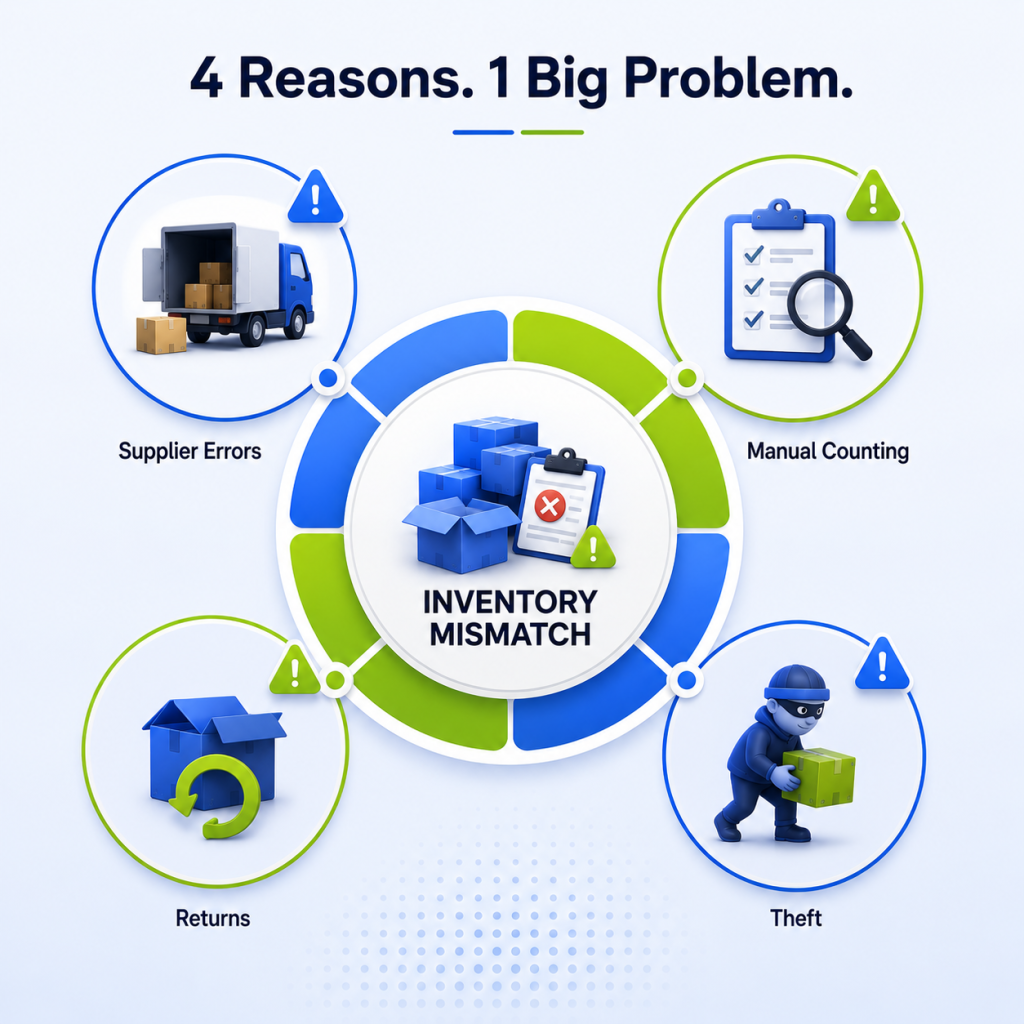
Let’s look at each of these in detail and understand how they affect your inventory:
1. Inventory theft during transportation or in the warehouse
Theft during transportation, warehouse handling mistakes, or unrecorded movements often result in your system showing full inventory while expensive products have already gone missing. For instance, a shipment arrives with 100 products, and your system records all 100. But when your team performs a physical stock count, they find only 95. Those missing five products create an inventory mismatch that affects your sales, stock planning, and replenishment decisions.
2. Inventory errors caused by vendor deliveries
Sometimes, vendors may send the wrong products, damaged items, or fewer products than mentioned in the shipment. If your team doesn’t verify the delivery properly or update the inventory correctly, your system will show a different stock than what you actually have, creating an inventory mismatch.
3. Incorrect stock counting and data entry
Inventory mismatches often happen because of simple human errors. Your team may count the wrong quantity, forget to scan a product, update the wrong SKU, or record the same stock movement twice. Even a small mistake can make your system show a different inventory than what is actually available. These errors usually come to light only when an on-hand stock count is done, forcing your team to spend time finding and fixing the mismatches.
4. Returned products are not added back to inventory
Many inventory mismatches happen because returned products are not updated in the system on time. Sometimes, the return status is not recorded, or the product is placed back on the shelf before the return is processed. As a result, your system shows incorrect inventory, sellable products remain blocked, and refunds or replacements take longer, affecting both your operations and customer experience.
The cost of inventory mismatches is often much higher than it looks. We have provided a simple calculation below to help you understand the actual cost of inventory mismatches.Yes, this is the amount of revenue a brand can lose because of inventory discrepancies. This can happen at any time while managing a business, no matter what kind of products you sell.
So, it is important to keep track of your inventory. For that, you need to understand how to find these inventory mismatches happening in your warehouse. We have mentioned some of them in the next part.
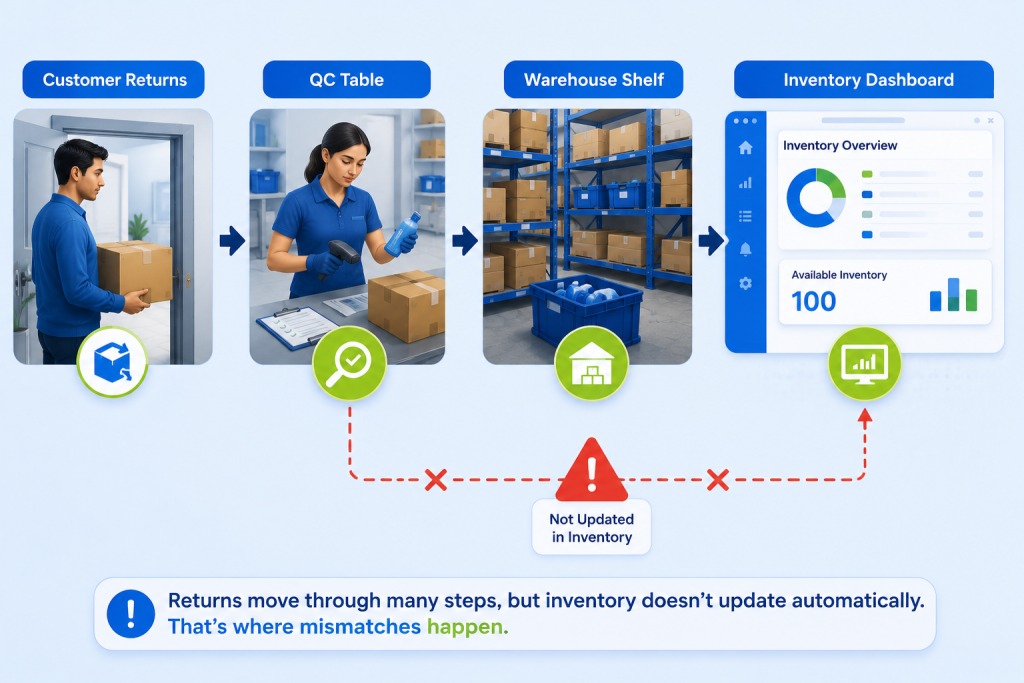
How to detect inventory mismatches early
Inventory discrepancies directly affect customer trust. When customers reach your store to purchase an item and find that it isn’t available, they leave unsatisfied. But don’t worry, we’ve come up with some practical steps you can take to find out where the problem actually starts.
Follow these steps to detect where inventory mismatches happen early:
1. Review purchase receipts and supplier deliveries
When products arrive from the vendor, the delivered quantity may not always match the purchase order. Some items could be missing, damaged, or incorrect. If you notice an inventory mismatch, compare the Purchase Order (PO) with the supplier’s delivery note and the actual quantity received. If there is any difference between these records, you’ve likely found where the inventory discrepancy started.
2. Find if any recently returned products were not adjusted
Sometimes the return is completed, but the inventory is not updated, or the returned item is marked incorrectly as damaged or pending inspection. Compare your return records with your inventory data to see if the returned quantity has been added back correctly. If it hasn’t, this could be the reason your inventory numbers don’t match.
3. Compare order fulfillment records with dispatched products
Check whether the correct SKU and quantity were picked and shipped for each order. If the wrong product or quantity was dispatched but the inventory was updated differently, it can create a mismatch between your system records and the actual stock available. This comparison helps you identify whether the discrepancy occurred during the fulfillment process.
4. Check recent inventory movements for missing or incorrect updates
Review recent inventory movements, such as stock received, sold, transferred, or adjusted, and compare them with your inventory records. If any movement is missing or updated with the wrong quantity, it can lead to inventory mismatches across your online and offline systems. This helps you identify where the discrepancy first occurred.
These are some common steps you can take to detect inventory mismatches. But what can you actually do to fix these mistakes and prevent them from happening again? We’ve covered that in the next section below.
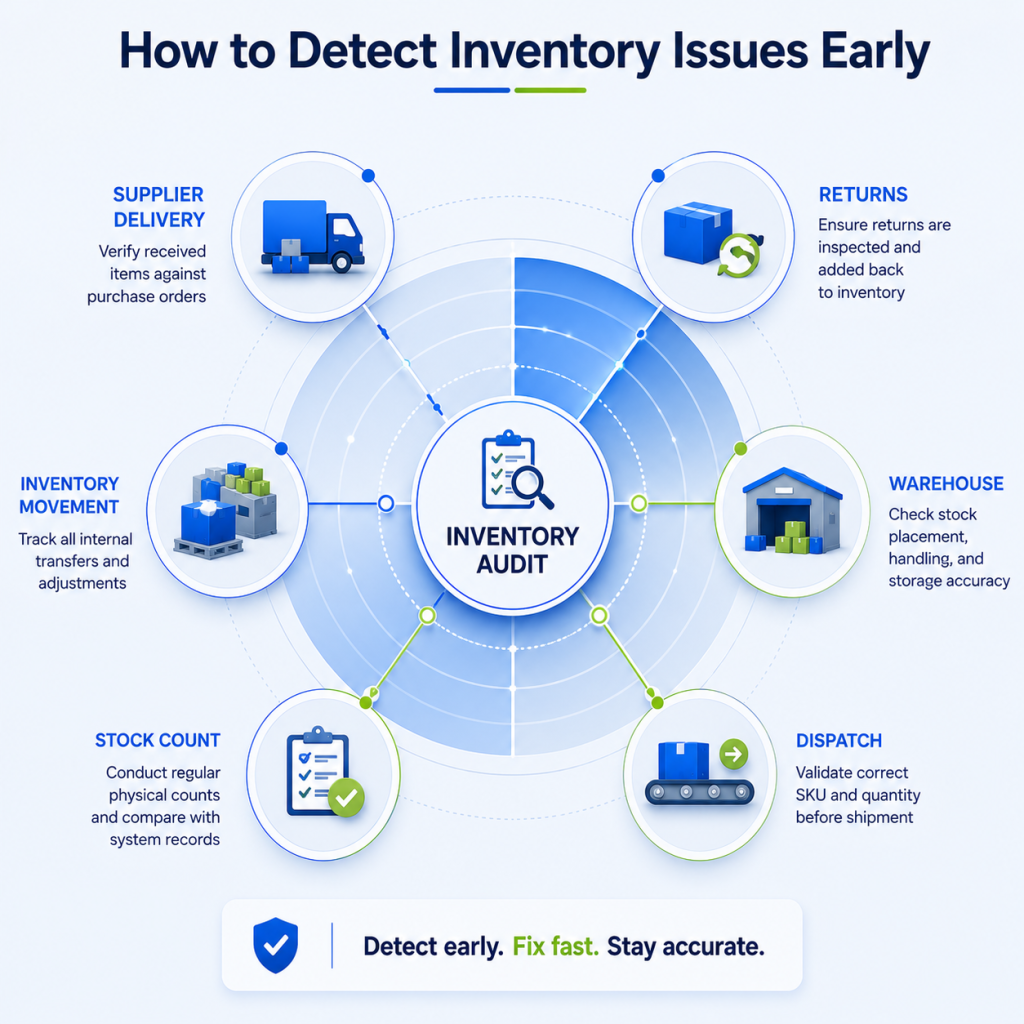
Industry best practices for preventing inventory mismatches
Sometimes, recurring inventory discrepancies are a sign that there’s a deeper issue in your inventory process. In such cases, you need proven practices that help reduce these errors and prevent them from happening again. If you’re facing this situation, you don’t have to figure it out on your own. Here are some best practices that many successful retail businesses follow to keep their inventory accurate.
1. Conduct regular stock audits to identify inventory discrepancies
Schedule weekly or monthly stock audits based on your order volume. Count the physical inventory, compare it with your system records, and investigate any differences immediately instead of waiting until they become larger issues.
2. Compare physical stock with system records on a regular basis
Don’t rely only on the numbers shown in your inventory system. Regularly compare them with the actual stock in your warehouse or store to identify missing, damaged, or misplaced products.
3. Keep inventory updated across all online and offline channels
Ensure your ecommerce website, marketplaces, POS, warehouse, and ERP are connected so that every inventory update is reflected across all systems without delay.
4. Record every inventory movement immediately
Update your inventory as soon as stock is received, sold, transferred, returned, or adjusted. Delaying these updates increases the chances of inventory mismatches.
5. Verify every supplier delivery before updating inventory
Before adding new stock to your inventory, match the supplier’s delivery with the purchase order and physically count the products. Record any missing, damaged, or incorrect items before accepting the shipment.
6. Use automation to eliminate manual inventory errors
Avoid updating inventory through spreadsheets or manual entries. Use an inventory management system that automatically updates stock after every sale, return, cancellation, or stock transfer.
These steps may seem overwhelming, but you don’t have to manage everything on your own. An inventory management system like Unicommerce can automate many of these tasks and help you maintain accurate inventory across all your sales channels. From reviewing inventory processes and simplifying reconciliation to keeping every system in sync, it helps reduce the chances of inventory mismatches.
In fact, 7,000+ brands trust Unicommerce to manage their inventory operations more efficiently. But how does it actually help prevent inventory mismatches? Let’s find out.
How Unicommerce ensures accurate inventory across online and offline channels
A good inventory management system gives you visibility and ensures inventory accuracy across every channel you have. It also keeps your stock movements accurate at every stage. Unicommerce offers the same to its 8,000+ clients, which is why they trust us.
With Unicommerce, your team gets:
- Real-time inventory visibility across marketplaces, websites, stores, and warehouses.
- Barcode-based inventory tracking to improve stock accuracy and reduce picking errors.
- Automated inventory updates for every sale, return, transfer, and stock adjustment.
- Regular inventory audits and reconciliation to quickly identify discrepancies.
- Low-stock alerts and inventory notifications to help your team take action before issues arise.
- A single source of truth for inventory across all online and offline channels.
Unicommerce offers 10+ features that help brands keep their online and offline inventory accurate every day. One example is Powerhouse91, which initially struggled with inventory mismatches. After implementing Unicommerce, the brand managed 5+ million inventory records through a unified inventory management system and reduced SLA breaches by 89.88%.
This happened because they came out of their shell and trusted an inventory management system. If you want to achieve similar results, you need to do the same.
Conclusion
Inventory discrepancies happen every day, but smart retailers make changes early rather than losing revenue, and they don’t let them become a constant headache. When you learn how to investigate and fix them, you create a foundation for an operation you can rely on with confidence.
An inventory management system is simply an upgrade that makes your processes more accurate, trustworthy, and efficient for day-to-day decision-making. So, if you want to reduce inventory mismatches and achieve better results, get a free demo today to explore how Unicommerce can help your brand improve inventory accuracy and support unified commerce.

FAQs:
1. What is an inventory mismatch?
An inventory mismatch happens when the stock shown in your inventory system is different from the actual stock available in your warehouse or store. This can happen because of manual errors, delayed updates, returns, theft, or incorrect supplier deliveries.
2. Why doesn’t my online and offline inventory match?
Your inventory may not match because stock updates are delayed, returns are not recorded properly, inventory is updated manually, or your online and offline systems are not connected in real time.
3. What causes inventory discrepancies?
Some of the most common causes include inventory theft, vendor delivery issues, manual data entry mistakes, incorrect stock counting, delayed inventory updates, and returned products that are not added back to inventory correctly.
4. How can I find inventory discrepancies?
Start by comparing purchase receipts, supplier deliveries, recent stock movements, order fulfillment records, and return records with your inventory data. This helps you identify where the mismatch first occurred.
5. How do I fix inventory mismatches?
Regular stock audits, comparing physical stock with system records, updating every inventory movement immediately, and using an inventory management system can help fix and prevent inventory mismatches.
6. How much can inventory discrepancies cost a business?
Inventory discrepancies can lead to overselling, stockouts, delayed orders, lost sales, and poor customer experience. Even small inventory errors can significantly impact revenue and profit margins over time.
7. How often should I perform inventory audits?
The frequency depends on your business size and order volume. Most retailers perform weekly or monthly stock audits, while high-volume businesses often audit fast-moving products more frequently.
8. Can an inventory management system reduce inventory mismatches?
Yes. A good inventory management system automatically updates inventory after every sale, return, transfer, or stock adjustment, helping keep inventory accurate across all online and offline channels.
9. What is inventory reconciliation?
Inventory reconciliation is the process of comparing your physical stock with your inventory records and correcting any differences to ensure your inventory data stays accurate.
10. How can I keep my online and offline inventory in sync?
Connect all your sales channels, warehouse, POS, and inventory system so every stock movement is updated in real time. Regular audits and automated inventory tracking also help maintain accurate inventory across all channels.
11. Why do dark stores experience increasing inventory mismatches due to the absence of a quick commerce management system?
Dark stores experience increasing inventory mismatches without a quick-commerce management system because stock moves rapidly across receiving, picking, replenishment, returns, and dispatch, while manual records are often updated with delays. This creates gaps between physical and system stock. As these errors build up, brands face phantom inventory, stockouts, overselling, failed picks, order cancellations, and lost sales.
Written by
Sakshi Sinha
Content Strategist · Unicommerce
I’m an avid reader who genuinely believes a great blog can shift how you see the world — or at least how you run your warehouse. At Unicommerce, I turn complex e-commerce operations into stories that actually click. When my screen-weary eyes finally beg for mercy, I’m out chasing Coco, my wonderfully chaotic dog, around the park. Life’s too short for boring content — or boring walks.