
Blinkit prioritises fast-moving, frequently reordered SKUs. These products are stocked across dark stores in different pin codes, where every slot is evaluated purely on turnover. If a product doesn’t sell consistently, it simply doesn’t retain space.
That’s why selling on Blinkit follows clear, performance-based stages, not default reach. Brands usually start at a trial level, where a minimum sales target must be achieved within a fixed timeline. Once cleared, distribution expands, typically 50+ dark stores at Level 1,100+ at Level 2, 200+ at Level 3, and eventually pan-India coverage. Each stage unlocks more reach, but only after demand is proven.
That’s where Blinkit advertising becomes the lever. Ads help strong SKUs get discovered faster, sell more consistently, and hit the performance thresholds needed to scale across levels.
Whether you’re an emerging brand just getting started or already selling on Blinkit and looking to crack the growth code, this guide breaks down the strategy you need to scale with confidence.
Let’s get into the depths of Blinkit advertising!
What is Blinkit Advertising?
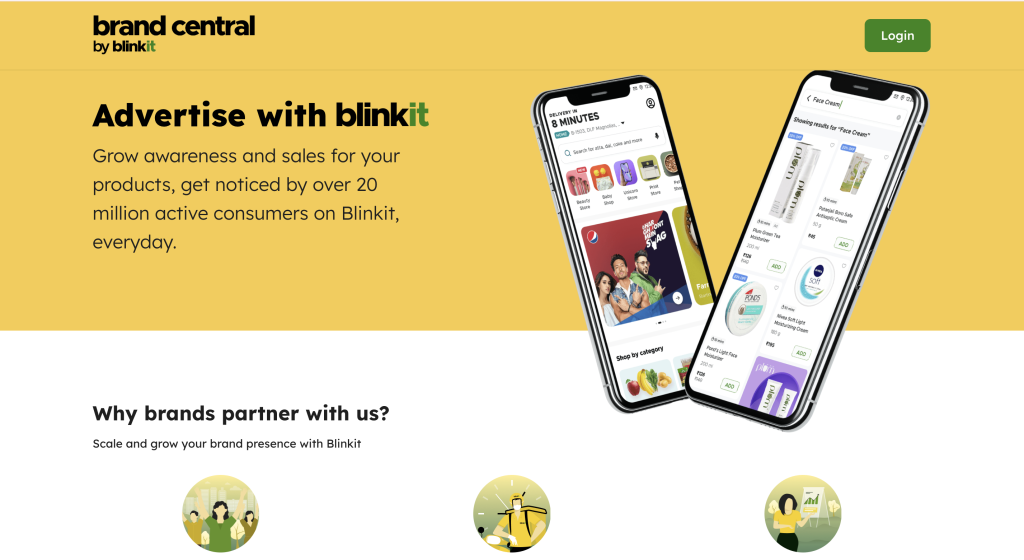
Blinkit advertising is a paid route for brands to https://brands.blinkit.com/secure prime visibility during a customer’s shopping journey. It is not a shortcut to sales, but a strategic way to earn the attention of potential customers when their buying intent is already high.
Think of it as paying for the eye-level shelf in a supermarket.
In physical retail, the products placed at eye level naturally get more visibility and a higher chance of being picked.
Blinkit works the same way.
When a customer searches for “snacks,” “milk,” or “face wash,” sponsored products appear at the top of search results or within premium placements. That top position increases visibility, clicks, and ultimately conversions.
In quick commerce, attention is limited, and decisions are fast. Being seen first often means being chosen first.
Why Selling on Blinkit Isn’t Enough Without Advertising?
Multiple brands within the same category fight for the same top positions. Customers rarely scroll beyond the first few results; they choose what they see first and what they recognize.
Advertising changes that!
It places your product in prime spots during high-intent searches, increasing the chances of clicks, impulse buys, and repeat orders. Instead of hoping to be discovered organically, Blinkit Ads ensure your brand gets seen when buying intent is strongest.
On a fast-moving platform like Blinkit, visibility isn’t optional; it’s strategic.
Benefits of Blinkit Advertisement for Brands
Advertising on Blinkit puts your brand in front of shoppers at the exact moment they’re ready to buy, not browsing, not comparing, but adding items to their cart.
Here is how it helps:
1. Reach shoppers with real purchase intent:
Blinkit ads appear inside an active buying journey. This means every impression carries higher intent, especially for essentials and last-minute needs.
2. Faster conversions and quicker learning:
With instant delivery and frequent ordering, ads can translate into sales within hours or days. You get rapid feedback on pricing, packs, and offers, with no long wait cycles.
3. Stronger visibility in crowded categories:
In categories where shelf space is limited and competition is intense, ads help your products stand out. Repeated exposure improves recall and increases the chance of repeat purchases.
4. Ideal for daily-use and repeat-buy products;
Essentials like groceries, snacks, beverages, home care, and personal care naturally benefit from quick commerce behavior. Ads reinforce habits and drive reorders.
5. Built for urban buying behavior:
As quick commerce becomes part of everyday life in cities, advertising on Blinkit lets your brand grow alongside this shift, capturing demand tied to urgency and convenience.
6. A channel for long-term growth, not just spikes:
When backed by steady inventory and consistent campaigns, Blinkit ads can build a loyal base of repeat customers, not just one-time orders.
Types of Blinkit Ad Formats That Can Be Used to Boost Visibility & Sales
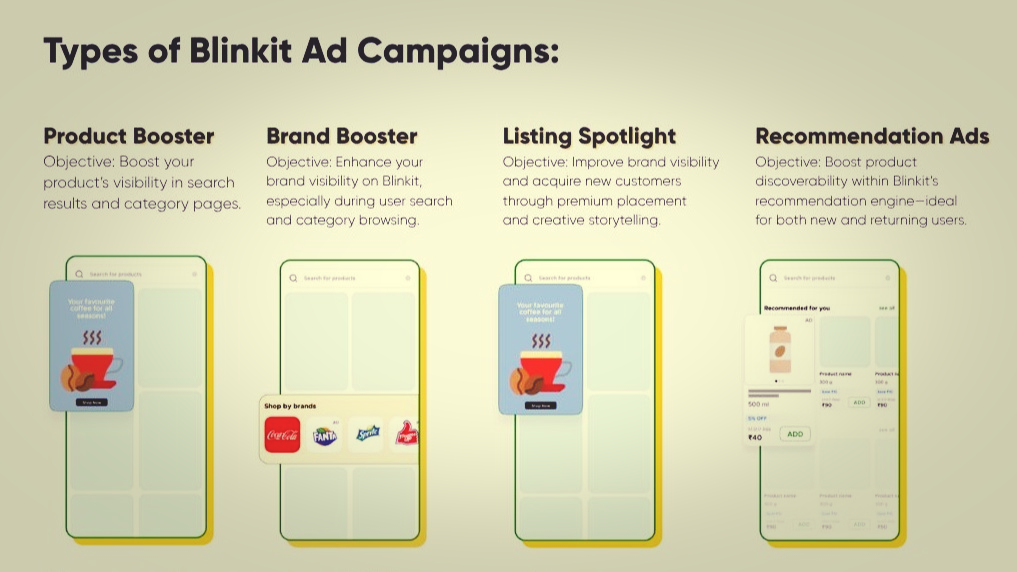
1. Sponsored Product Ads (Search & Category Boosters)
Sponsored Product Ads push your SKUs to the top of search results and category listings. These are keyword- or category-based placements that appear naturally within the shopping flow.
You can target by:
Keywords (e.g., “coffee,” “detergent,” “snacks”)
Categories (e.g., “beverages,” “pulses,” “personal care”)
These ads appear with an “Add to Cart” option directly visible, reducing friction and increasing impulse purchases.
This format works best for:
- High-demand SKUs
- Competitive categories
- Brands looking for quick sales velocity
2. Brand Spotlight / Listing Spotlight Ads
This format acts like a mini storefront inside Blinkit. It allows brands to display multiple products in a scrollable carousel within a single placement.
Instead of promoting just one SKU, you promote your range.
This is useful when:
- Launching a new product line
- Promoting bundled items
- Increasing average order value
- Building brand recall beyond one product
It gives shoppers a broader view of your brand at a glance.
3. Display Ads (Banner & Contextual Placements)
Best for: Visibility and brand awareness
Display Ads appear in premium sections of the app, such as category pages, search results, or contextual placements. For example, a cooking oil brand may appear when users browse related grocery categories.
These placements are usually higher investments and are often coordinated through Blinkit’s ad team.
They work best when:
- Launching new products
- Running seasonal campaigns
- Supporting high-volume promotions
- Reinforcing brand presence alongside sponsored listings
4. Awareness Boosters (Add-On Visibility Tools)
Awareness Booster Ads on Blinkit are additional visibility tools designed to amplify campaigns and create urgency-driven demand. Unlike keyword-based sponsored listings, these formats focus on grabbing attention quickly, often through time-sensitive placements like push notifications, to drive immediate action and short-term sales momentum.
They work best for:
- Launching flash sales or limited-time discounts
- Supporting festive or seasonal campaigns
- Driving short-term spikes in traffic and orders
- Amplifying larger ad campaigns with urgency-led messaging
5. Recommendation Ads
Recommendation Ads boost product discoverability within Blinkit’s recommendation engine, placing your SKUs in high-intent browsing moments. They work well for both new and returning users by increasing visibility where purchase decisions naturally happen.
They work best for:
- Complementary or add-on products (cross-sell opportunities)
- Increasing add-to-cart rates without heavy keyword bidding
- Driving repeat purchases for high-frequency SKUs
- Gaining incremental visibility beyond search placements
How Much Does Blinkit Charge to Start Running Ads for Product Visibility?
Blinkit does not openly publish a standard advertising rate card or clear pricing for sellers wanting to run ads for product visibility. To know the exact charges, you typically need to register as a seller or contact their support/sales team to see specific pricing details.
So, What Budget Do Sellers Typically Start With?
Since Blinkit does not publicly state exact ad costs, most budget guidance comes from seller experiences and widely discussed brand case studies shared across professional forums and on LinkedIn by D2C founders and marketplace sellers.
Based on these consistently reported experiences:
- ₹25,000–₹50,000 is commonly used as a starter ad budget by brands testing product visibility on Blinkit
- This budget is typically allocated to sponsored listings or keyword-based placements rather than premium homepage banners
- Sellers usually start with 1–2 priority SKUs, measure visibility and conversions, and scale only if unit economics make sense.
Now that you have a clear understanding of how Blinkit advertising works and what budget typically makes sense to get started, let’s move from theory to execution.
How to Start Running Ads on Blinkit to Boost Product Visibility
To run ads on Blinkit, sellers must first complete a few foundational steps. Once these are in place, brands can start bidding for ad placements and track performance directly through Blinkit’s self-serve advertising platform.
Step 1: Complete Seller Onboarding
Before advertising, you need to be onboarded as a seller or brand partner on Blinkit. This includes completing business verification, GST and banking details, and gaining access to Blinkit’s seller or brand dashboard. Advertising features are unlocked only after this onboarding process is completed.
Step 2: List Your Products
Once onboarded, sellers must list their products with accurate titles, images, pricing, and category mapping. Well-optimised listings are important because Blinkit ads primarily promote existing product listings rather than standalone creatives. Most brands start advertising with 1–2 priority SKUs to test visibility and demand.
Step 3: Start Running Ads and Choose Campaign Type
Blinkit’s ad platform is auction-based, meaning ad placements are decided through bidding. Sellers can choose between two broad campaign objectives:
Blinkit’s ad platform is auction-based, which means product visibility is decided through competitive bidding. Sellers place bids to secure ad placements, and higher bids generally improve the chances of appearing in prominent positions within search results or category listings.
Ads on Blinkit are primarily run as cost-per-click (CPC) campaigns, where sellers pay when a shopper clicks on their product. These campaigns are commonly used to increase product discovery, improve add-to-cart actions, and drive sales.
To control where products appear, sellers can:
- Bid on relevant keywords suggested by Blinkit
- Use category targeting for broader visibility
- Add negative keywords to avoid irrelevant traffic
Blinkit also enforces a minimum bid threshold, and actual placement depends on your bid amount, competition, and relevance. Budgets remain flexible, allowing sellers to define an overall campaign budget and a daily spend limit.
In essence, sellers compete for visibility through CPC bidding, monitor performance, and adjust bids based on what delivers the best return.
Step 4: Understand the Blinkit Bidding Process
Bidding on Blinkit works through its auction system, where multiple brands compete for the same placements:
- Blinkit suggests recommended keywords and average bid prices
- Sellers can set minimum bids (CPM-based) and define their budget
- Keyword targeting supports negative keywords to avoid irrelevant traffic
- Higher bids generally improve chances of securing top placements when competition exists.
Blinkit also allows flexible budgeting:
- Overall campaign budget (fixed)
- Daily budget, which can vary based on brand strategy
Step 5: Use Bid Booster for Automated Optimisation
Blinkit has introduced a feature called Bid Booster to help brands automate bidding. When enabled, Bid Booster automatically increases bids if competitors try to outbid you.
- The maximum boost allowed is up to 50%
- Bid adjustments apply mainly to keyword-based Product Booster Ads
- Boosted bids help maintain top positions, while non-boosted placements run at the original bid value
This feature is useful for brands that want consistent visibility without manual bid adjustments.
Step 6: Track Performance and Measure Results
Blinkit’s self-serve platform provides detailed brand and campaign reports to help sellers understand ad performance.
- Reach campaign reports typically include impressions, add-to-cart actions, and campaign cost.
- Performance campaign reports include impressions, add-to-carts, sales, return on ad spend (ROAS), and new user acquisition.
These insights help brands decide which SKUs to scale, which keywords to optimise, and how to allocate future ad budgets more effectively.
Blinkit vs Other Quick Commerce Ad Platforms
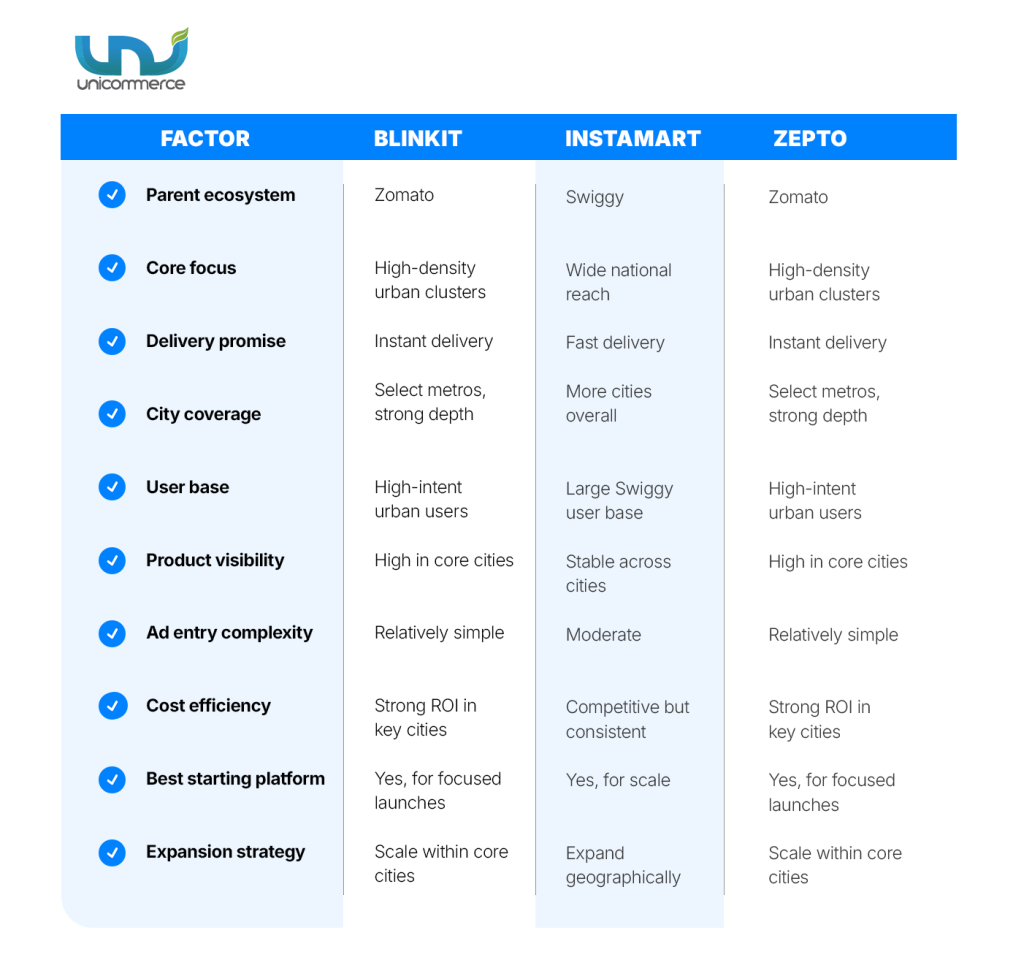
A quick comparison of Blinkit with other leading quick commerce platforms to help brands decide where to start and how to scale their ad investments.
Which Brand Categories Benefit Most From Blinkit?
- Packaged Food & Snacks: High impulse purchases, frequent reorders
- Beverages & Breakfast Items: Craving-led demand, time-sensitive needs
- Personal Care & Beauty (Basics): Repeat usage, low consideration buying
- Household & Home Care: Essential items, strong brand stickiness
- Pet Care Essentials: Predictable demand, high loyalty
Common Blinkit Ad Mistakes That Hurt Performance
Before you put money behind ads on Blinkit, it’s worth pausing to avoid a few common missteps. These mistakes often lead to wasted spend, poor visibility, and misleading performance signals, especially for first-time advertisers.
1. Running Ads Without Defining the Right Product Metrics
If you don’t know what success looks like, optimisation becomes guesswork. Before launching ads, align on the ABC framework of product metrics, which helps separate real growth from vanity numbers.
2. Adoption Metrics:
These indicate whether users are actually engaging with your product:
- % of active users interacting with the product
- Funnel movement (e.g., product views → add to cart)
These metrics confirm early traction and visibility effectiveness.
3. Business Impact Metrics:
These show whether ads are delivering tangible business value:
- Overall conversion rate on the platform
- Revenue contribution and number of engaged buyers
If these don’t improve, visibility alone isn’t enough.
4. Change in User Behavior:
These capture long-term value and repeat demand:
- Retention across weeks or months
- Lifetime Value (LTV)
These metrics reveal whether customers keep returning after the first purchase.
For a deeper explanation of how to choose and interpret these metrics, Blinkit explains the ABC of product success metrics in detail here.
Other Common Mistakes That Hurt Performance
- Launching ads with weak listings: Poor images, unclear titles, or wrong categories reduce conversion.
- Promoting too many SKUs early: Dilutes budget and learning; start with 1–2 priority products.
- Overbidding for top placement: Higher visibility doesn’t always mean better returns.
- Targeting low-intent keywords: Clicks without conversions increase costs.
- Ignoring offers and value cues: Blinkit shoppers respond quickly to clear deals.
- Letting campaigns run without review: Regular optimisation is essential in a competitive marketplace.
Advanced Blinkit Advertising Strategies That Actually Work
Here are some key takeaways for brands aspiring to grow on Blinkit:
1. Build a Layered Keyword Architecture:
Combine high-volume generic keywords with branded terms and intent-specific phrases. Continuously analyse search trends and refine product titles to mirror how shoppers actually search; relevance improves both visibility and conversion efficiency.
2. Design Campaigns Around Strong Aalue Triggers:
Blinkit is a speed-driven platform. Clear, instantly understandable offers, value packs, price-offs, and limited-time deals reduce decision friction. The sharper the value proposition, the higher the conversion lift.
3. Optimise Creatives for Thumb-Stopping Clarity:
Since most transactions happen on mobile, visuals must communicate in seconds. Use clean pack shots, strong contrast, and minimal but bold offer highlights that remain readable without zooming.
4. Align Budgets With High-Intent Demand Windows:
Performance improves when campaigns are aligned with seasonal spikes, cultural events, and consumption cycles. Instead of spreading spending evenly, concentrate budgets during moments when buying urgency is naturally higher.
5. Optimise Like a Performance Marketer:
Treat campaigns as dynamic assets. Adjust bids based on conversion data, pause SKUs that lack velocity, refresh creatives proactively, and double down only where contribution margins justify scale.
Scale Your Brand on Blinkit
On a platform like Blinkit, simply listing your product isn’t enough; you need momentum. That’s where Blinkit advertising makes the difference. The right Blinkit ads can help your SKUs sell faster, meet performance targets, and unlock broader dark-store access across cities. But visibility is only one side of the equation.
As demand increases, your operations must keep pace; inventory accuracy, order processing speed, and fulfilment efficiency directly impact whether ad-driven growth translates into sustained performance. When backed by strong execution, a well-planned Blinkit ad campaign doesn’t just boost visibility; it builds steady, scalable growth.
FAQs
1. What Is Blinkit Advertising?
Blinkit advertising is a paid visibility solution that allows brands to promote their products within the Blinkit app through sponsored placements, recommendation ads, and display formats to drive clicks, conversions, and repeat purchases.
2. How Do Blinkit Ads Work?
Blinkit ads operate on an auction-based system, primarily using a cost-per-click (CPC) model. Brands bid on keywords or categories, and higher relevance plus competitive bids improve product visibility in search and browsing results.
3. How Much Does Blinkit Charge for Advertising?
Blinkit does not publicly disclose fixed ad pricing. However, most brands typically start with a ₹25,000–₹50,000 test budget to evaluate performance before scaling their Blinkit ad campaign.
4. Is Blinkit Advertising Necessary to Scale on the Platform?
Yes. Since Blinkit prioritises fast-moving SKUs and limited dark store slots, Blinkit advertising helps products gain visibility faster and meet performance thresholds required for distribution expansion.
5. What Are the Different Types of Blinkit Ads Available?
Brands can run Sponsored Product Ads, Brand Spotlight ads, Display Ads, Recommendation Ads, and Awareness Boosters like push notifications, depending on whether the goal is conversions, visibility, or brand recall.
6. What Budget Should Brands Start With for Blinkit Ads?
Most sellers begin with 1–2 priority SKUs and allocate a controlled test budget. The goal is to validate unit economics before increasing spend.
7. Which Products Perform Best With Blinkit Advertising?
Daily-use, fast-moving products such as snacks, beverages, groceries, personal care, home care, and pet essentials typically perform best due to repeat purchase behaviour.
8. How Do I Measure the Success of a Blinkit Ad Campaign?
Key metrics include impressions, add-to-cart rate, conversion rate, ROAS, retention rate, and Lifetime Value (LTV). These help determine both short-term performance and long-term customer value.
9. Can Small or Emerging D2C Brands Run Blinkit Ads?
Yes. Blinkit advertising is accessible to emerging brands once seller onboarding is complete. Starting small and optimising gradually is the recommended approach.
10. What Are Common Mistakes to Avoid in Blinkit Ads?
Common mistakes include promoting too many SKUs at once, bidding aggressively without tracking ROI, ignoring listing optimisation, targeting low-intent keywords, and not reviewing campaign data regularly.
11. How do I track sell-through rates across Blinkit and Zepto separately?
You can track sell-through rates by analyzing SKU-level sales and inventory data for each platform. A centralized dashboard provides channel-wise performance insights for better decision-making.
12. How to analyse which SKUs are performing best across quick commerce platforms?
Use analytics tools within your OMS/WMS to track SKU-level sales, velocity, and profitability across platforms. This helps identify top-performing products and optimize inventory allocation.