
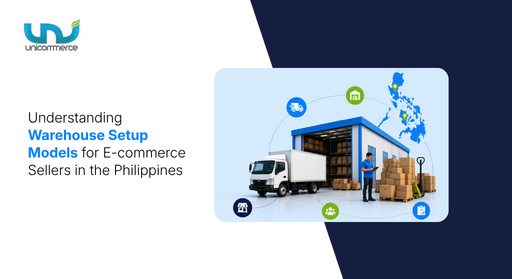
I have spoken with multiple e-commerce sellers and their operations teams, and the problem I consistently found is customer delivery expectations. A customer places an order, and even after three days, the team is unable to deliver the product, despite it being shipped on time and everything appearing correct internally.
Deliveries often get delayed due to the country's archipelagic geography, which slows timelines outside major cities. And the problem now turns into:
- Customers asking, “Where is my order?”
- Support teams are getting repeat queries
- Delivery expectations are going off track outside major cities
And here, you need to determine your warehouse setup that aligns with this geography and improves delivery across regions without letting warehouse and shipping costs spiral out of control. And this blog is exactly for that.
Let’s read on!
What Is a Warehouse Setup Model?
A warehouse setup model is simply how you decide to store, manage, and ship your inventory. It answers practical questions like:
- Do you operate from one central location or multiple smaller ones?
- Do you own your warehouse, rent shared space, or outsource entirely?
- How does your inventory get closer to the customer before the order is even placed?
The usual thinking is: "We'll stock everything in one warehouse and manage it from there." But the problem starts when order volumes begin increasing. That single warehouse model slowly starts creating issues like slow deliveries, higher shipping costs, unhappy customers outside major cities, and operational chaos during peak seasons.
So, which warehouse setup models are available in the market that can help solve the challenges you are currently dealing with? Let’s understand some of the main warehouse setup models and how they help different types of businesses.
6 Warehouse Setup Models Every E-Commerce Seller Should Know
A brand managing 100 orders a day will not have the same operational needs as a seller handling thousands of orders across Metro Manila, Visayas, and Mindanao. So, we have put together the top 6 warehouse setup models that support different business needs depending on order volumes, how fast your business is growing, and the kind of delivery experience you want customers to have.
So, here are the top 6 warehouse setup models every brand should know:
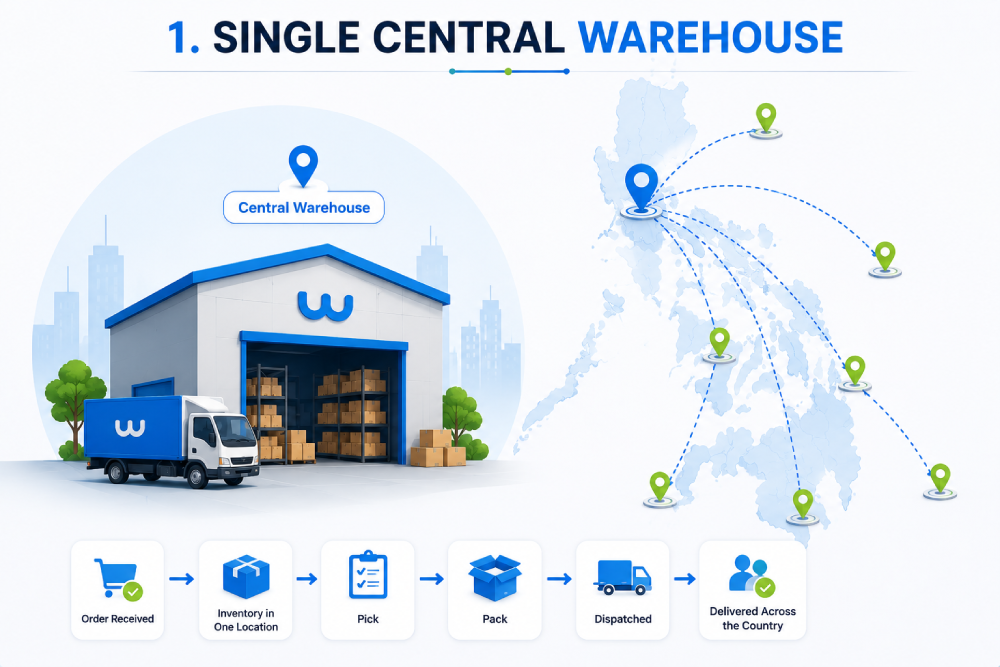
1. Single Central Warehouse
This warehouse model is for sellers operating mainly from one location and handling all receiving, storage, and dispatch from that single facility.
How it works: All inventory is kept in one place. When an order comes in, it gets picked, packed, and dispatched from that location through a courier to customers across the country.
Who needs this warehouse model:
- New businesses are still validating demand
- Brands with manageable order volumes, handling around 50–100 orders a day
- Businesses with smaller SKU catalogs, such as around 100 products
- Sellers receiving most of their orders from one city only
2. Distributed Warehouse Model (The Regional Expansion)
This warehouse model is for sellers receiving orders from multiple regions and looking to reduce delivery timelines outside major cities.]
How it works: Instead of keeping all inventory in one place, products are distributed across two or more fulfillment locations. For instance, one warehouse in Metro Manila, one in Cebu, and another in Davao. When an order comes in, it gets routed to the warehouse closest to the customer location.
Who needs this warehouse model:
- Brands receiving high order volumes outside one city.
- Businesses selling across different cities are facing delivery delays
- Sellers handling around 500–1,000+ orders daily across multiple regions
- Operations teams are ready to manage inventory across multiple warehouse locations
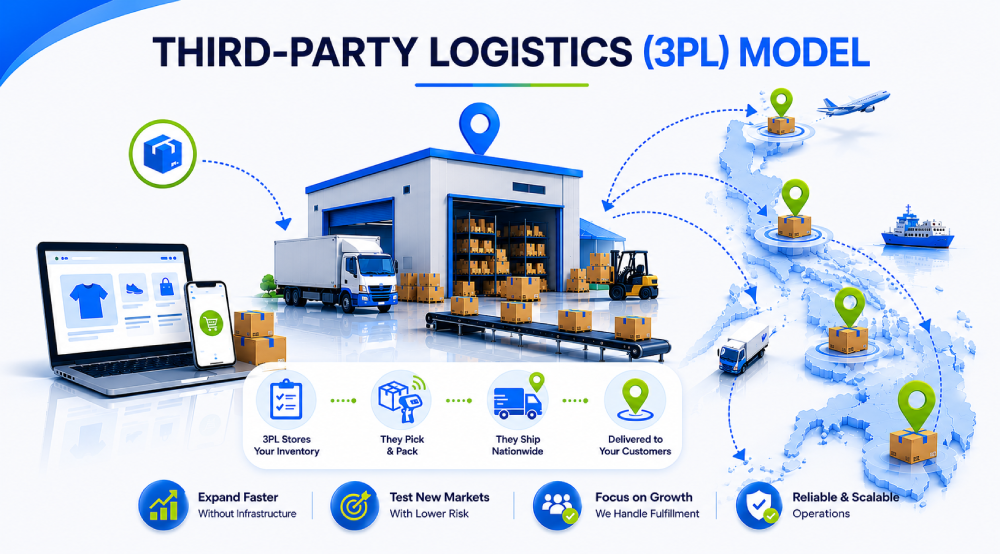
3. Third-Party Logistics (3PL) Model
In a third-party logistics (3PL) model, businesses outsource storage and fulfillment operations to a logistics partner that handles inventory storage, picking, packing, and shipping.
How it works: You send your inventory to the 3PL provider's facility. When customers place orders through your website or marketplaces, the 3PL processes and fulfills them on your behalf.
Who it works for:
- Brands are planning to expand into multiple regions without investing in their own warehouse infrastructure.
- Sellers are testing demand in new markets before setting up dedicated facilities.
- Growing businesses that want teams to spend more time on product, sales, and customer growth rather than on warehouse operations.
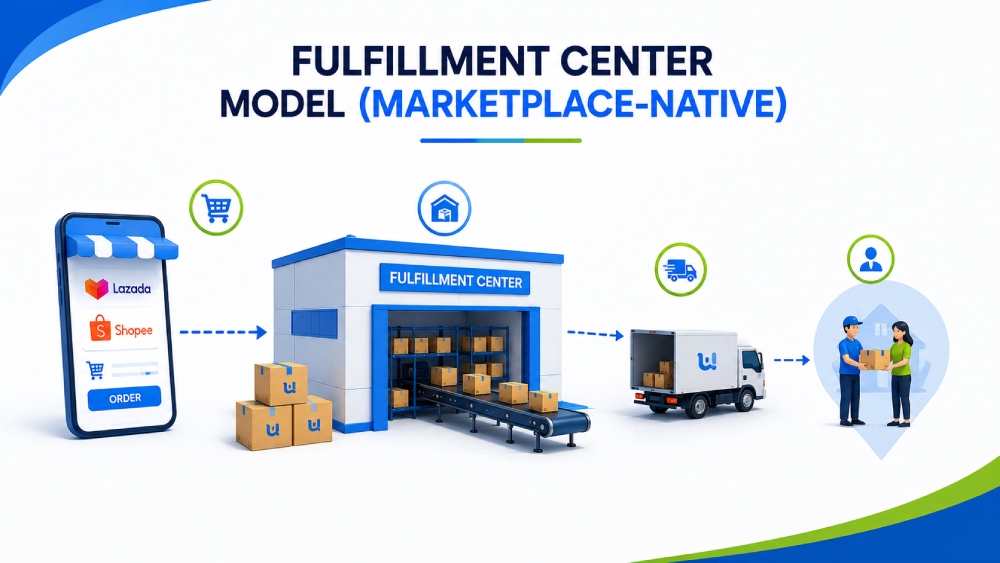
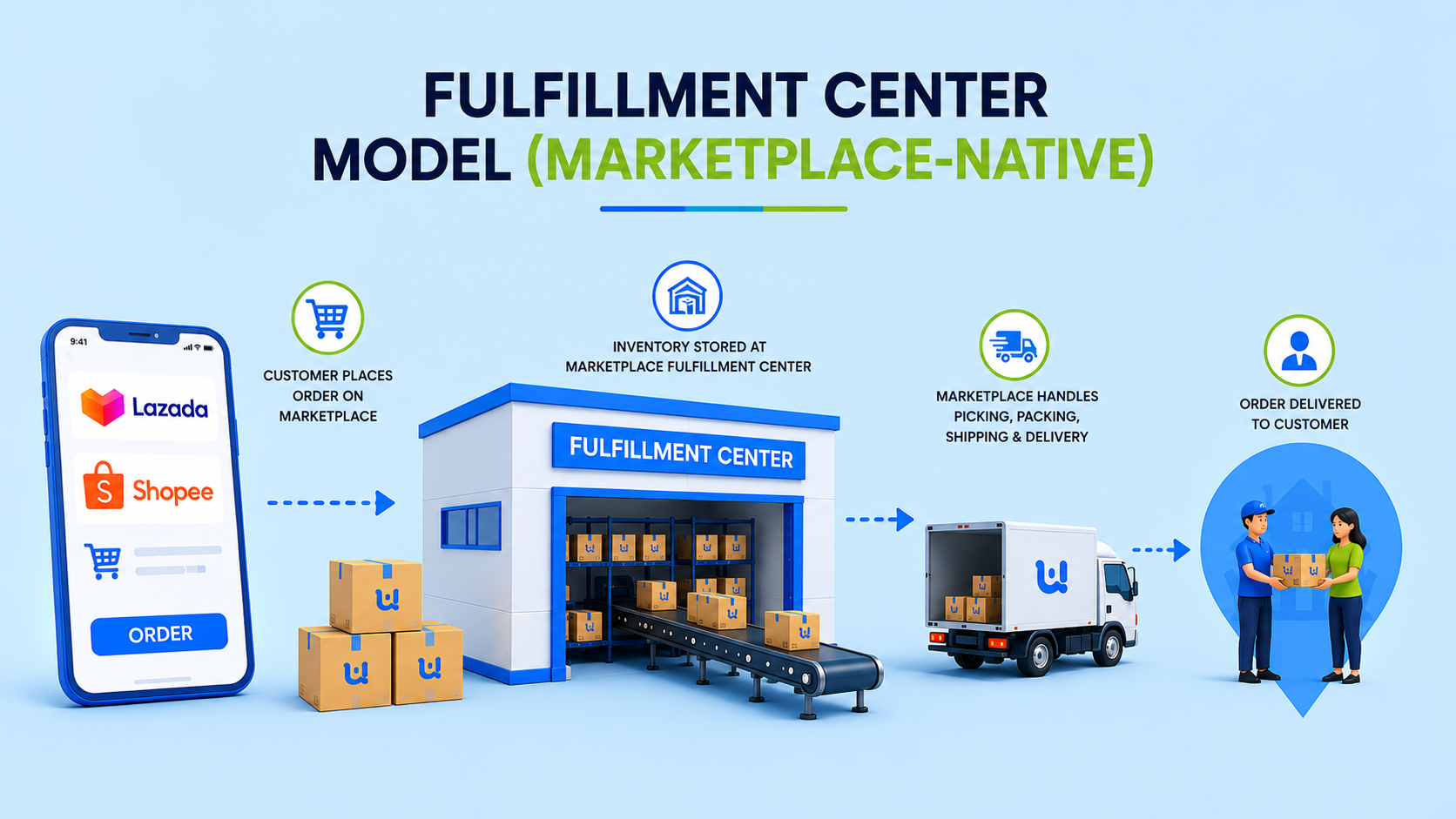
4. Fulfillment Center Model (Marketplace-Native)
Platforms like Lazada and Shopee run their own fulfillment programs, and the seller who primarily sells through marketplaces handled by the platform itself.
How it works: You send inventory to the marketplace's fulfillment center. Once customers place orders through that platform, the platform handles picking, packing, shipping, and delivery.
Who needs this warehouse model:
- Marketplace-first sellers with high order volumes on a single platform.
- Brands want to use the platform's logistics network without setting up their own warehouse operations.
- Businesses handling fast-moving products with predictable demand.
- Sellers are looking for quicker deliveries without managing day-to-day fulfillment activities internally.
5. Dark Store Model (Hyper-Local Fulfillment)
A dark store is a retail-like space set up exclusively for fulfillment. Think of it as a micro-warehouse embedded within a neighborhood or commercial area.
How it works: Inventory is stored closer to high-demand customer locations such as BGC, Makati, or Lahug in Cebu. When an order comes in, it gets fulfilled from the nearest dark store, helping businesses achieve same-day or even 2–4 hour deliveries.
Who needs this warehouse model:
- Brands in categories like beauty, FMCG, fashion, and grocery, where fast delivery matters.
- Sellers with loyal repeat customers in specific city locations.
- Businesses handling high-demand products with frequent daily orders.
- Brands exploring quick commerce or instant delivery models.
6. Hybrid Model
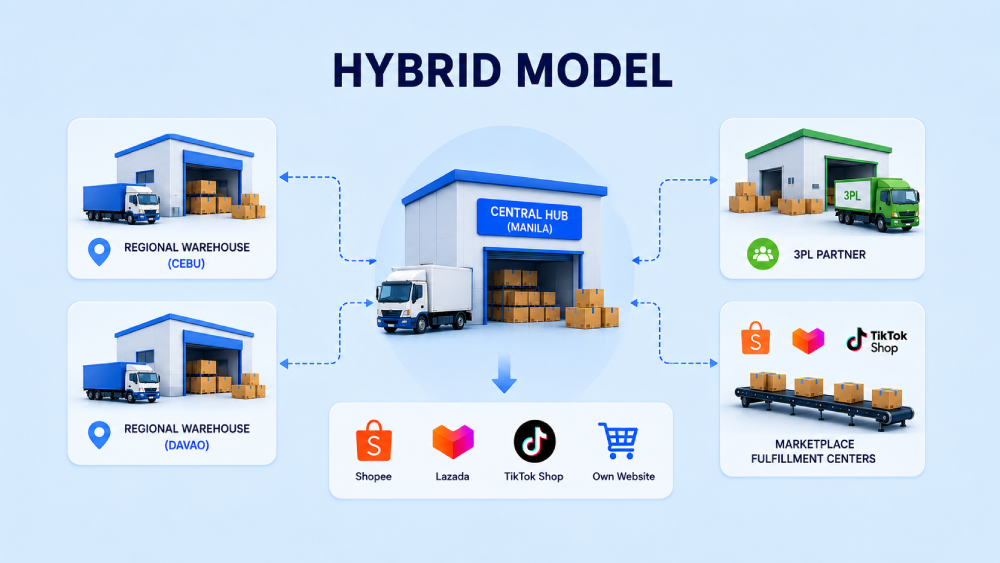
This warehouse model is for businesses handling crossed a meaningful revenue threshold and are running their business across multiple regions, channels, and customer demands at the same time.
How it works: Instead of relying on one setup, businesses combine multiple warehouse models together. For instance, a central hub in Manila handles bulk inventory and slow-moving products, regional warehouses in Cebu and Davao fulfill local demand, a 3PL manages additional order volume during peak season, and high-selling products sit inside marketplace fulfillment centers for faster deliveries.
Who needs this warehouse model:
- Businesses selling across multiple regions and channels
- Brands handling high order volumes across Shopee, Lazada, TikTok Shop, and their own website
- Sellers managing thousands of orders daily
- Operations teams looking for flexibility during peak seasons and rapid growth periods
To understand this quickly, check out the table below, which shows which warehouse setup model fits your business requirements best.
How to Choose the Right Warehouse Model for Where Your Business Is Today
Here's a practical framework:
| Where You Are | Recommended Model |
|---|---|
| Starting out and mostly receiving orders from one city, such as Metro Manila | Single central warehouse |
| Growing nationally and receiving delivery complaints from regions outside your primary city | Move toward distributed warehouses |
| Want regional expansion without heavy warehouse investment | 3PL with WMS integration |
| Marketplace-first business with high order volume on one platform | Fulfillment center for top-selling SKUs |
| Fast delivery is becoming a key customer expectation | Test a dark store in one city |
| Operating at scale across multiple channels and multiple regions | Hybrid model with centralized WMS |
Selecting one can be an easy choice. But the real challenge starts after choosing the model because it also comes with more operational decisions and increasing complexity.
What Happens After You Choose the Right Model?
You may still be able to manage a single central warehouse. But if you are already working with other warehouse models or thinking of moving toward one of them, you will start facing multiple day-to-day challenges while managing orders and warehouse operations.
Some of the common challenges businesses face after moving beyond a single warehouse model are:
- Stock mismatches across different warehouse locations
- Difficulty tracking inventory visibility in real time
- Manual order allocation between warehouses
- Constant switching between spreadsheets and dashboards
- Delays during peak order periods
- Overselling because the inventory is not updated everywhere together
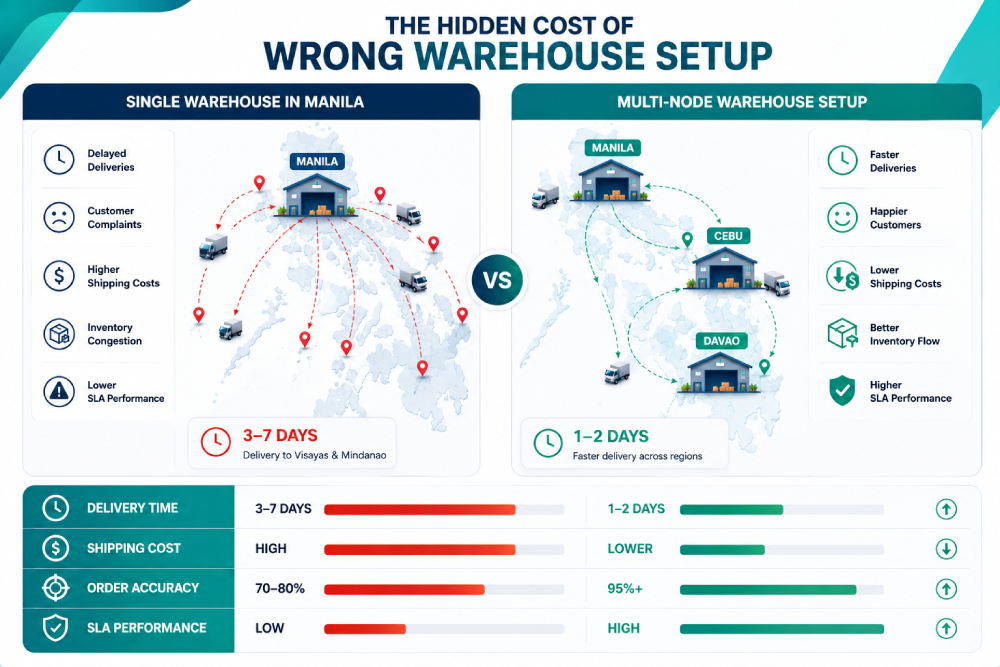
These may look like small operational gaps initially, but as order volumes grow, they slowly start affecting customer experience and revenue, and then the question becomes, “How will you manage all of it?”
Because manual data handling and constantly juggling spreadsheets can only lead to wrong decisions and revenue leakage. Here, you need a proper warehouse system that offers features that make your day-to-day warehouse activities easier. And, the Unicommerce warehouse system is designed to handle these operational pain points. Let's understand this in more detail.
How Can Unicommerce Warehouse System Make Managing These Models Easier?
Unicommerce is one of the leading SaaS platforms offering a warehouse system with multiple features for managing day-to-day warehouse operations. It is trusted by many brands because the platform helps solve operational challenges while making warehouse processes easier to manage.
Here are some important capabilities in the warehouse management system offered by Unicommerce:
1. Bin, Shelf, and Zone-Level Inventory Tracking
Instead of only showing inventory at the warehouse level, Unicommerce tracks products down to the exact bin, shelf, or rack location.
Helps with:
- Faster picking
- Less time spent searching for products
- Better inventory visibility across locations
2. System-Guided Pick Path Optimization
The system creates the shortest picking route for warehouse staff instead of sending them across different aisles randomly.
Helps with:
- Faster order processing
- Reduced picker movement
- Better peak season performance
3. Smart Putaway Rules
Automatically place incoming inventory in the right storage location based on predefined rules.
Helps with:
- Better space utilization
- Faster picking
- Organized inventory movement
4. Batch and Cluster Picking
Pick products for multiple orders in a single trip instead of one order at a time.
Helps with:
- Higher productivity
- Fewer warehouse trips
- Faster fulfillment
5. Cycle Counting
Continuously verify inventory without stopping warehouse operations using a handheld barcode device.
Helps with:
- Better stock accuracy
- Fewer stock mismatches
- Reduced overselling
6. GRN and Gate Pass Scanning
Verify inventory when products enter the warehouse with barcode-enabled technology
Helps with:
- Better receiving accuracy
- Fewer inventory errors
- Improved stock visibility
Together, these features help warehouse models run smoothly instead of creating additional operational work for your team.
Wrapping Up
The warehouse model you choose today may work for current order volumes, but as the business grows, operations also start becoming difficult. More locations, more inventory movement, and more orders usually mean more chances for stock mismatches, delays, and manual work.
Choosing the right warehouse setup matters. But having a warehouse system that helps manage everything together matters too. See how the Unicommerce warehouse system helps make day-to-day warehouse operations easier.
FAQs:
1. Which warehouse setup works best for growing e-commerce businesses in the Philippines?
It depends on your order volume and where orders are coming from. Businesses receiving orders from one city can start with a single warehouse setup, while growing businesses usually move toward distributed or hybrid models.
2. When should a business move from a single warehouse to multiple warehouses?
Common signs include increasing delivery delays, rising shipping costs, growing order volumes, and more customers coming from different regions.
3. Can one warehouse system manage multiple warehouse locations together?
Yes. A warehouse system helps track inventory, orders, and stock movement across multiple locations from one place.
4. How do warehouse systems help reduce delivery delays?
Warehouse systems route orders from the nearest warehouse location and provide better inventory visibility, helping reduce fulfillment time.
5. Can warehouse systems manage inventory across marketplaces and websites together?
Yes. Modern warehouse systems sync inventory across marketplaces and websites in real time to reduce stock mismatches and overselling.
6. What problems happen when warehouse operations are managed manually?
Businesses often face stock mismatches, delayed order processing, inventory visibility issues, and errors caused by spreadsheet-based tracking.
7. How do warehouse systems help during high-volume sale periods?
Warehouse systems automate picking, inventory updates, and order processing, helping teams manage sudden order spikes more efficiently.
8. What should businesses look for in a warehouse system?
Important capabilities include multi-warehouse management, inventory visibility, order routing, marketplace integration, returns handling, and reporting features.
9. Can warehouse systems support 3PL and fulfillment center operations?
Yes. Many warehouse systems work alongside 3PL partners and fulfillment centers, helping businesses manage everything from one dashboard.
10. Is a warehouse system only useful for large businesses?
No. Even growing businesses can benefit because warehouse systems help reduce manual work and create a stronger operational process as order volumes increase.