
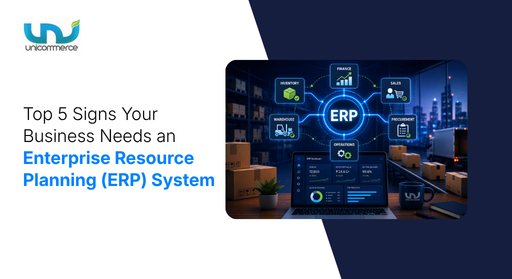
Every ambitious business that is processing 5,000+ orders every month across 3+ marketplaces like Flipkart, Myntra, AJIO, and its own website eventually reaches a stage where manual work starts slowing down growth and reducing profitability. It starts exposing the cracks in the business, such as:
- “Why did we lose ₹30 lakh in potential sales last month?”
- “Why do we need to hire 15 more operations executives every year just to keep things running?”
- “Why are our revenues growing, but our profits aren’t?”
To answer these questions, you need to evaluate your operations end to end. But by the time you find the answer, operational inefficiencies and outdated systems have often become your biggest expense.
To overcome these challenges, you need an Enterprise resource system. However, implementing one becomes much harder when most of the damage has already been done. If you can identify the warning signs before these problems arise, you can stop them before they impact your business. This blog will walk you through the signs your business needs an ERP system.
Let’s read on!
Why does your business need an ERP system?
We don’t start using something until we realize how beneficial it can be for our business. It usually takes one or two warning signs to make us rethink whether our growth is going smoothly or if it’s time to upgrade our in-house software.
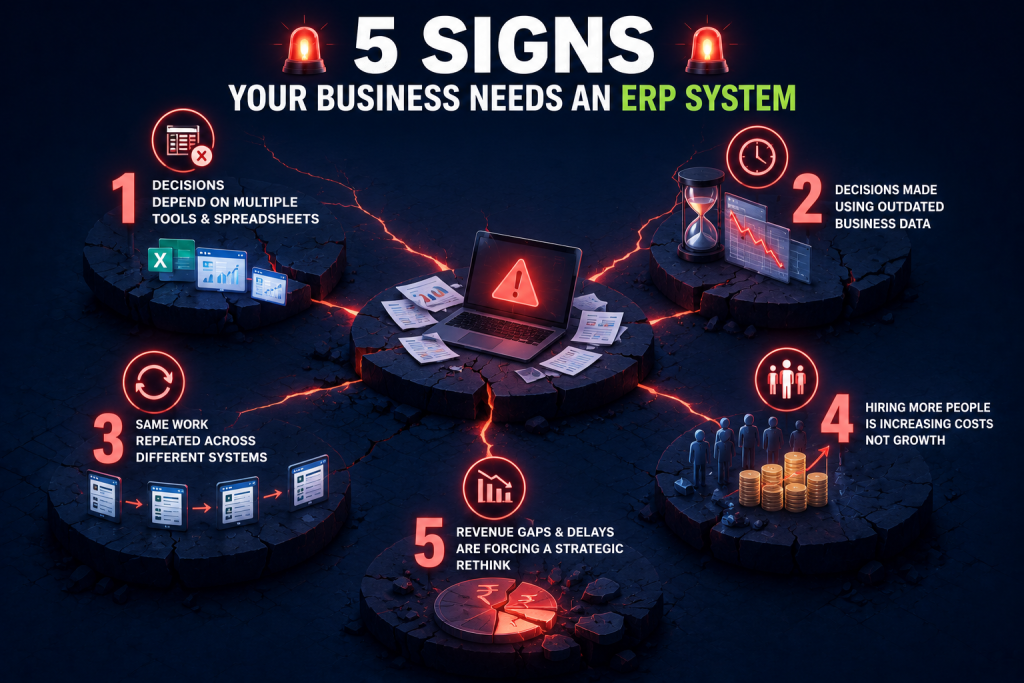
So, understand these top 5 signs when should a business implement an ERP system:
Sign 1: Business decisions depend on multiple tools and spreadsheets.
When your business reaches a certain scale, such as processing 5000+ orders every month and selling across 5+ marketplaces, including your own website, your data stops flowing and starts living in silos. Each department has its own software to manage its data, creating disconnected systems across the business, and you don’t have a single source of truth for business reporting
Now think about walking into your Monday review meeting, and your CEO suddenly asks for last week’s inventory position, pending orders, sales performance, and cash flow. Now you’re chasing data from one spreadsheet to another. And when you don’t have the exact data, the purpose of the meeting isn’t met, which also makes people doubt your capabilities.
This happens because your business has outgrown disconnected systems, and it is the first sign that you need an Enterprise resource system in your tech stack.
Sign 2: You make decisions using outdated business data
As data is scattered across multiple platforms, business decision-making becomes increasingly challenging. By the time you gather and evaluate information from different systems, it is often already outdated. Instead of making informed decisions, you end up relying on incomplete or delayed data, limiting your ability to respond at the right time. This lack of visibility can lead to poor oversight, missed opportunities, and a reactive approach to running your business instead of a proactive one.
For instance, one of your hero products suddenly starts gaining traction. The demand is there, but because your inventory, sales, and procurement data are spread across different systems, you fail to identify the trend in time. Rather than prioritizing the product that needs immediate replenishment, your team focuses on another SKU. By the time the actual demand is recognized, the product is already out of stock, resulting in lost sales and missed revenue opportunities.
3. Your team repeats the same work across different systems
When you are integrated with one or two marketplaces, you have control over your operations. But as the number of marketplaces increases, everything starts feeling cluttered. Your operations team has to manually transfer the same information from one platform to another, increasing the chances of human errors.
For instance, an order is received on Amazon. Your executive manually enters the order details into your inventory system, updates the stock in a spreadsheet, shares the dispatch details with the warehouse team, and later enters the same information into your accounting software for invoicing. The same process is repeated for orders coming from Flipkart, Myntra, and your own website.
As your order volume grows, so does the manual work. A single typo can lead to incorrect inventory, duplicate invoices, missed orders, or delayed dispatches. Instead of focusing on improving operations, your team spends hours entering the same data into multiple systems.
4. Hiring more people is increasing costs instead of growth.
When your business continues to run on disconnected systems, every new marketplace, warehouse, or sales channel adds more manual work.
For instance, you started with Amazon and Flipkart, where your existing team could comfortably manage operations. As your business grew, you added AJIO, Myntra, Nykaa, and your own website to increase sales. Instead of scaling with the same team, you had to hire 8–10 more operations executives just to manage marketplace orders, update inventory, reconcile reports, create invoices, coordinate with warehouses, and prepare daily business reports.
Despite the larger team, manual tasks still resulted in inventory mismatches, delayed dispatches, invoicing errors, and marketplace penalties, increasing your operational costs instead of your efficiency.
5. Revenue gaps and operational delays are forcing a strategic rethink.
You might have thought that your business was running smoothly until a major revenue gap surprised you and gave you a reason to rethink your existing systems. Outdated systems work well when you have 200–500 orders per month, but as your order volume increases, things start getting messy.
Most of you know the Nestlé brand, right? Between 1990 and 2005, the company faced challenges with disconnected systems and inconsistent processes. To solve this, Nestlé moved to a centralized platform that improved visibility and simplified operations across thousands of locations. This shows how upgrading outdated systems can transform business operations.
These are the clear signs that your business needs an enterprise resource system to improve operational efficiency. But most scaling brands already have an ERP for small business needs. The real question is whether your current system can support future growth: If my orders suddenly double next month, will my current setup actually cope?
To answer these questions, check out the next section, where we’ll discuss the signs that indicate when you should go for an ERP system upgrade or integration.
Can your current systems handle the next influx of orders?
If you’re still unsure whether it’s time to upgrade your ERP, don’t rely on assumptions. Audit your current operations. These five checkpoints will tell you whether your existing systems are supporting your growth or slowing it down.
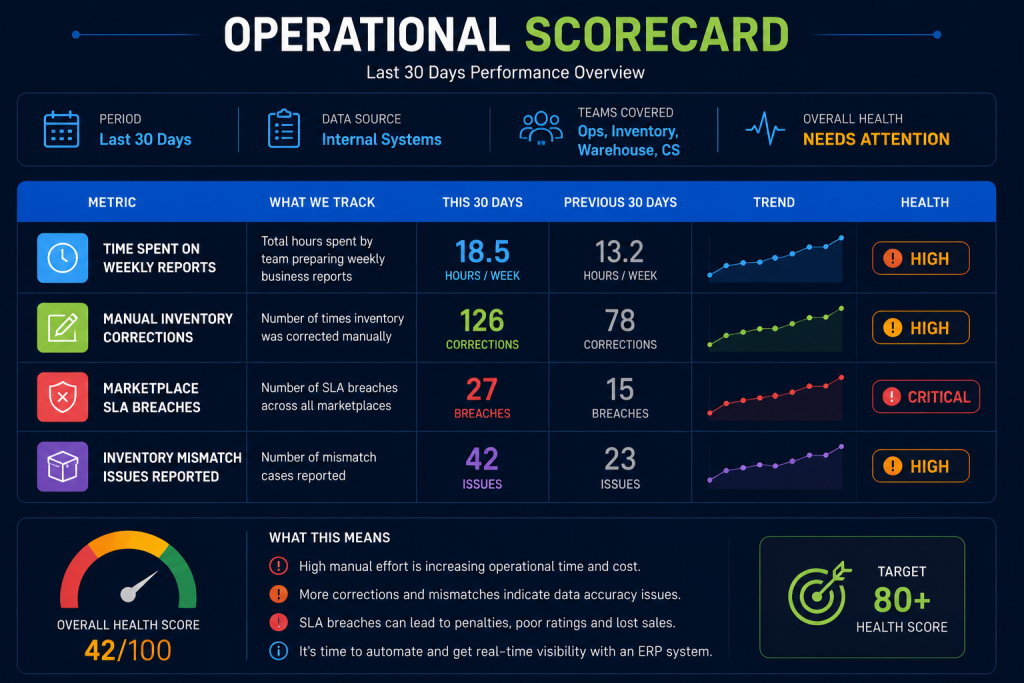
Step 1: Build a simple operational scorecard to find business-critical numbers
To build this scorecard, track your business performance over the last 30 days.
- How much time does your team spend preparing weekly reports?
- How many manual inventory corrections did they make?
- How many marketplace SLA breaches occurred?
- How many inventory mismatch issues were reported?
If these numbers keep increasing every month, it’s a clear sign that your current ERP software can no longer keep up with your order volume.
Step 2: Identify how much time your team usually spends on report generation
Ask your Sales, Operations, Warehouse, and Finance teams one simple question: “How long does it take to prepare one accurate business report?” If each team says 2–4 hours, it’s time to rethink your current systems. It clearly indicates that your data is scattered across multiple platforms instead of being available in one centralized dashboard.
Step 3: Measure how much work is still done by your team
Ask your Operations Head to list every activity that still requires human intervention. If the list includes manually updating inventory, creating invoices, preparing reports, reconciling marketplace orders, and sharing dispatch details, your Enterprise resource system is not reducing manual work. Instead, it is only increasing your team’s workload, consuming valuable time, and reducing overall productivity.
Step 4: Evaluate how many times your collected data report has mistakes
Look at your last five leadership meetings and identify the reporting issues raised by your leadership team, such as:
- “These numbers don’t look right. Please verify them.”
- “This report needs correction.”
- “Why is Finance reporting different numbers than Operations?”
- “Please check the figures again and come back with the exact numbers.”
If these remarks are becoming common in your review meetings, they are your answer. It clearly indicates that your current systems are not providing accurate, real-time visibility, making it difficult for leadership to trust the data and make informed decisions.
Step 5: Test whether your systems can handle peak demand
Today, your business might be processing 100–300 orders a day, and your team is managing everything comfortably. But what happens when that number suddenly increases?
Think, you will receive 1,000+ orders a day next month. Can your current team and Enterprise resource system handle that volume without delays, manual work, or questioning the accuracy of the numbers? If you can’t confidently say yes, your business has already reached the stage where it needs an ERP upgrade.
These steps help you identify operational gaps before they start affecting your sales, revenue, and profitability. Still not convinced? Let’s calculate the actual cost of delaying an ERP upgrade.
What is an ERP system, and how does it impact your revenue and profitability?
An ERP system is the nervous system of an organization. It ensures every department communicates with each other instantly and accurately. It automates business processes and gives you complete visibility into your business through a single dashboard by bringing together data from accounting, inventory, procurement, manufacturing, sales, marketing, warehousing, and human resources.
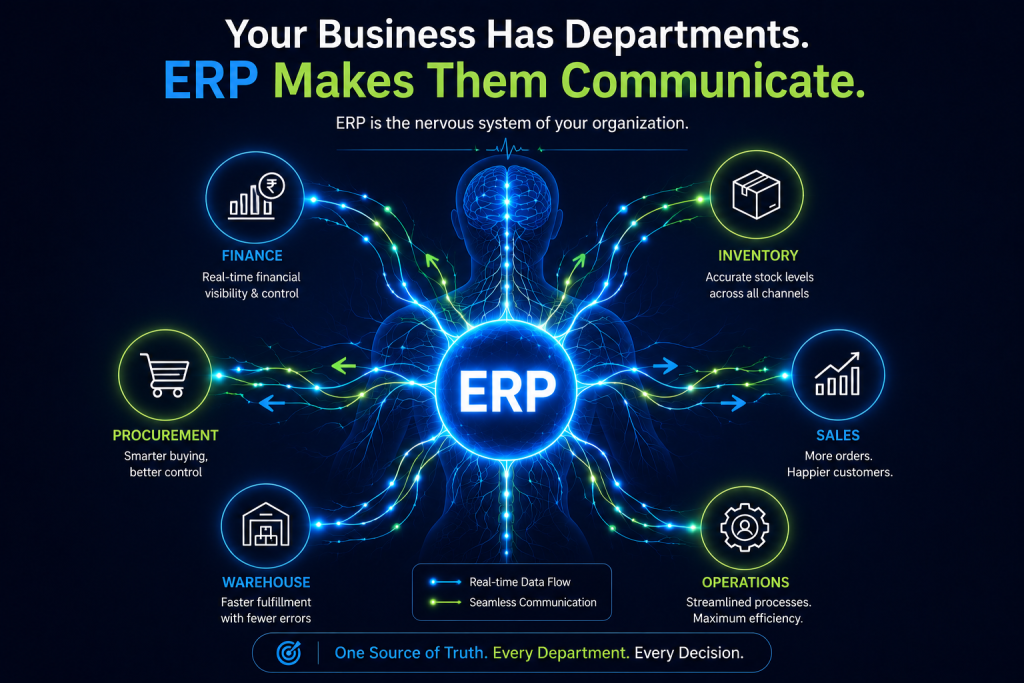
Now, let’s look at how not having ERP software for growing businesses affects them from a numbers and revenue perspective.
One simple calculation every Founder should know.
Assume your business generated ₹8 crore in sales last month. Now, one of your best-selling SKUs contributes ₹2 lakh in daily sales. Due to delayed inventory visibility and replenishment planning, this product goes out of stock for 5 days.
Daily sales loss: ₹2,00,000
Stockout duration: 5 days
Potential revenue loss = ₹2,00,000 × 5 = ₹10,00,000
In just 5 days, you lose ₹10 lakh in potential sales. At the same time, you might continue purchasing slow-moving inventory because your reports don’t clearly show what is actually selling, blocking even more working capital.
These mistakes happen because you’re relying on spreadsheets, where every manual error can lead to revenue loss. An Enterprise resource system eliminates these dependencies through automation.
If you’re now convinced, the next question is: Will your ERP actually improve your operations or just become another piece of software in your tech stack? For that, I’ve shortlisted some of the most important features that growing brands look for when upgrading to a new Enterprise resource system.
What makes an ERP worth every rupee you invest?
Every business needs an upgrade according to its order volume, revenue, profitability, customer base, and more. So, choosing any ERP without evaluating everything first can double your costs or waste your money. But you don’t have to worry about that, as I’m mentioning the features according to different business needs and how to choose the right ERP software for ecommerce businesses.
1. If you’re selling up to 3,000 orders per month
| Feature | Why It Matters |
|---|---|
| Basic Financial Management | Manage accounting, expenses, payments, and financial records from a single system. |
| Inventory Management | Track stock levels, reduce inventory errors, and avoid unnecessary stock holding. |
| Basic Reporting Dashboard | Monitor sales, orders, and inventory with real-time insights instead of spreadsheets. |
| GST & Invoice Automation | Generate GST-compliant invoices quickly while reducing manual errors. |
| Cloud Access | Access your business data securely anytime, anywhere, from any device. |
2. If you’re selling 3,000 to 5000 orders per month
| Feature | Why It Matters |
|---|---|
| Multi-channel Inventory Sync | Keep inventory synchronized across marketplaces in real time. |
| Automated Workflows | Reduce dependency on manual processes and improve operational efficiency. |
| CRM Integration | Maintain customer data and improve customer relationship management. |
| Real-time Business Dashboards | Monitor orders, inventory, and sales from one centralized dashboard. |
| Approval Workflows | Control business processes with defined approvals for purchases, expenses, and operations. |
| Integration Capabilities | Connect your ERP with accounting software, CRM, marketplaces, and other business systems. |
3. If you’re selling 5000+ orders per month across 3+ marketplaces and multiple warehouses
| Feature | Why It Matters |
|---|---|
| Centralized Business Management | Manage finance, sales, inventory, procurement, and operations from a single platform. |
| Supply Chain Management | Improve demand planning, procurement, inventory flow, and distribution efficiency. |
| Workflow Automation | Reduce manual work across departments and improve operational efficiency. |
| Advanced Reporting & Analytics | Make faster, data-driven decisions with real-time business insights. |
| API & Marketplace Integrations | Connect marketplaces, ERP, WMS, OMS, accounting, and logistics systems seamlessly. |
| Financial Management | Track revenue, profitability, expenses, and cash flow with greater accuracy. |
| Role-based Access Control | Provide users with secure access only to the information relevant to their roles. |
| Scalability & Customization | Adapt the ERP system as your business grows and operational needs evolve. |
I hope you have checked the features according to your business needs. This will help you invest in the right Enterprise resource system and make an informed decision. But ERP implementation for e-commerce comes with the technical part: managing the IT expertise gaps. Let’s understand it briefly.
How to bridge IT expertise gaps during ERP implementation
ERP implementation doesn’t require your team to know everything from day one. The right approach is to identify the gaps early and bring in the right expertise where needed, like:
- Find where you need ERP implementation: Identify which ERP tasks your team can handle and where external support is required.
- Bring in ERP experts: Hire consultants or staff augmentation partners for platform configuration, integrations, and data migration.
- Keep business teams involved: Your operations and business teams understand the workflows best, so involve them throughout the implementation process.
By now, you’ve probably realized that upgrading your Enterprise resource system is only one part of the journey. The next step is making sure it connects seamlessly with the rest of your business operations. Let’s see how Unicommerce helps you do that.
How Unicommerce connects with your ERP without disrupting your existing systems
If you already have an ERP, you don’t need to replace it. Unicommerce integrates with your existing enterprise resource system and connects it with your marketplaces, warehouses, logistics partners, and other business systems, creating a seamless flow of orders, inventory, invoices, returns, and shipment data.
But if you don’t have one, Unicommerce offers integrations with multiple best ERP systems for retail businesses with e-commerce and D2C brands, including SAP, Oracle NetSuite, Microsoft Dynamics, LogicERP, Odoo, ERPNext, Ginesys, Wondersoft, and TallyPrime through pre-built connectors.
For businesses with unique operational requirements, Unicommerce also offers Custom ERP Integration through Open APIs. If your business requires only specific data to be exchanged between systems, our APIs can be configured accordingly.
Today, 8,000+ businesses trust Unicommerce, and many brands choose our ERP integration capabilities because they are flexible and easy to implement. For instance, leading beauty brand Mamaearth required a robust SAP integration to streamline its online and offline operations. Unicommerce integrated seamlessly with SAP, helping the brand achieve a 99.99%+ fulfillment rate, enabling real-time inventory management, and scaling to over 3 million dispatches every month through comprehensive automation.
So, whether you’re using an enterprise resource system or not, Unicommerce helps you extend your existing ERP without disrupting your current systems.
Conclusion
Adding an enterprise resource system is a long-term investment that helps recover revenue and reduce manual workload. But if you need a solution that goes beyond ERP software and streamlines everything from inventory management to fulfillment operations, Unicommerce is the right choice. It helps you eliminate operational bottlenecks, automate workflows, and build a business that’s ready to scale.
Every delayed order, inventory mismatch, and manual error has a direct impact on your revenue and customer experience. The sooner you build a connected operation, the sooner your business can grow with confidence. Discover how Unicommerce can help you find the best ERP system for retail businesses. Book a free demo now!
FAQs:
1. What is ERP system (Enterprise Resource Planning)?
An Enterprise Resource Planning (ERP) system is a centralized platform that connects different business functions like accounting, inventory, procurement, sales, warehousing, and operations in one place. It helps businesses automate processes, reduce manual dependency, and get real-time visibility through a single dashboard.
2. What are the key features to look for in an Enterprise Management System for a mid-sized company?
For a mid-sized company, the right enterprise management system should help simplify daily operations and improve visibility across departments.
Some important features to look for include:
- Multi-channel inventory synchronization to keep stock updated across marketplaces and sales channels.
- Automated workflows to reduce repetitive manual tasks.
- Real-time business dashboards to track orders, sales, and inventory.
- CRM integration to manage customer data effectively.
- Approval workflows to control business processes.
- Integration capabilities to connect with accounting software, marketplaces, logistics partners, and other business tools.
The features you choose should depend on your order volume, business complexity, and future growth plans.
3. What are common implementation challenges for enterprise management systems and how can I avoid them?
ERP implementation challenges usually happen because businesses don’t identify their operational gaps before starting the process. Some common challenges include:
- Lack of internal IT expertise
- Data migration issues
- Difficulty in configuring the system according to business processes
- Resistance from teams due to changes in existing workflows
- Poor integration with existing systems
To avoid these challenges, start with a gap analysis, involve your business teams during implementation, and seek support from ERP experts wherever required for configuration, integration, and data migration.
4. What are some ERP software options available in India?
Businesses in India can choose from multiple ERP solutions depending on their requirements, industry, and operational scale. Some commonly used ERP solutions include SAP, Oracle NetSuite, Microsoft Dynamics, LogicERP, Odoo, ERPNext, Ginesys, Wondersoft, and TallyPrime. However, choosing an ERP should not only depend on the software name. Businesses should evaluate factors like scalability, integrations, automation capabilities, reporting, and whether it can support future growth.
5. What are the advantages and disadvantages of ERP?
An ERP system helps businesses improve visibility, automate repetitive processes, and connect different departments through a centralized platform. The biggest advantage of ERP is that it creates a single source of truth by bringing data from finance, inventory, sales, procurement, and operations into one system. It helps businesses make faster decisions with real-time data, reduce manual work, improve operational efficiency, and scale smoothly as the business grows.
However, ERP implementation also comes with challenges. It requires investment in software, configuration, training, and integration. Businesses may also face difficulties during data migration, system customization, and employee adoption. To get the maximum value from an ERP system, companies should choose a solution that matches their business requirements and future growth plans.
6. What are the 6 main benefits of ERP?
The six main benefits of enterprise resource planning software include better visibility, improved decision-making, process automation, reduced operational costs, improved collaboration, and business scalability. An ERP system connects different departments and provides real-time access to accurate business data, helping teams make informed decisions faster.
7. What should I look for when comparing different ERP systems for my company?
When comparing different ERP systems, you should look at whether the solution can support your current operations and future growth. Start by evaluating features like scalability, integration capabilities, automation, reporting, and customization options. Your ERP should be able to connect with your existing systems, such as marketplaces, accounting software, CRM, WMS, OMS, and logistics platforms, without creating additional complexity.
8. What are ERP implementation challenges for small businesses?
Small businesses often face challenges like limited IT expertise, data migration issues, employee training, and difficulty adapting existing workflows. To avoid these problems, businesses should clearly define their requirements and choose an ERP that fits their operational needs.
9. What is the ERP implementation cost for small businesses?
ERP implementation cost depends on factors like software pricing, customization, integrations, number of users, and support requirements. Instead of focusing only on cost, businesses should evaluate the long-term value an ERP provides through automation, efficiency, and reduced operational errors.
10. How does ERP improve business efficiency?
ERP improves business efficiency by connecting different departments and automating repetitive tasks. It reduces manual work, improves data accuracy, and helps teams make faster decisions with real-time business insights.
11. How does ERP reduce manual data entry?
ERP reduces manual data entry by automatically sharing information between systems like sales, inventory, finance, and operations. This eliminates repetitive updates, reduces human errors, and saves time for teams.
Written by
Sakshi Sinha
Content Strategist · Unicommerce
I’m an avid reader who genuinely believes a great blog can shift how you see the world or at least how you run your warehouse. At Unicommerce, I turn complex e-commerce operations into stories that actually click. When my screen-weary eyes finally beg for mercy, I’m out chasing Coco, my wonderfully chaotic dog, around the park. Life’s too short for boring content or boring walks.