
If you’re comparing ERP vs WMS for your UAE business, the right choice depends on what you need to manage. An ERP system manages broader business functions such as finance, procurement, accounting, HR, and reporting, while a warehouse management system (WMS) focuses on warehouse operations such as inventory tracking, picking, packing, and fulfillment.
You may be considering an ERP warehouse management system because your finance team needs better reporting, your operations team wants faster fulfillment, or your warehouse team wants to reduce manual work. But choosing between ERP and WMS can be confusing, especially when both systems appear to offer inventory and warehouse-related capabilities.
So, which system is right for your business? This blog compares ERP and WMS based on their core functions, warehouse capabilities, use cases, and business needs to help you choose the right setup for your UAE operations.
First, Let’s Talk About What’s Happening Inside UAE Warehouses Right Now
Your customers now expect next-day delivery and sometimes even same-day delivery, and now your competitors are everywhere on websites, marketplaces, TikTok Shop, physical stores, and often across multiple regions at the same time. And you have to match that too, right?
But growth sounds exciting until operations start feeling the pressure. And this starts creating warehouse problems like:
- Stock mismatch: Stock is showing as available online, but it was already sold somewhere else.
- Pick inefficiencies: Warehouse teams are picking the wrong products because inventory locations are unclear.
- Too much pressure on your system: Systems that worked for 500 orders suddenly start struggling at 5,000.
- Disconnected systems: Inventory numbers differ across ERP systems, marketplaces, and shipping platforms.
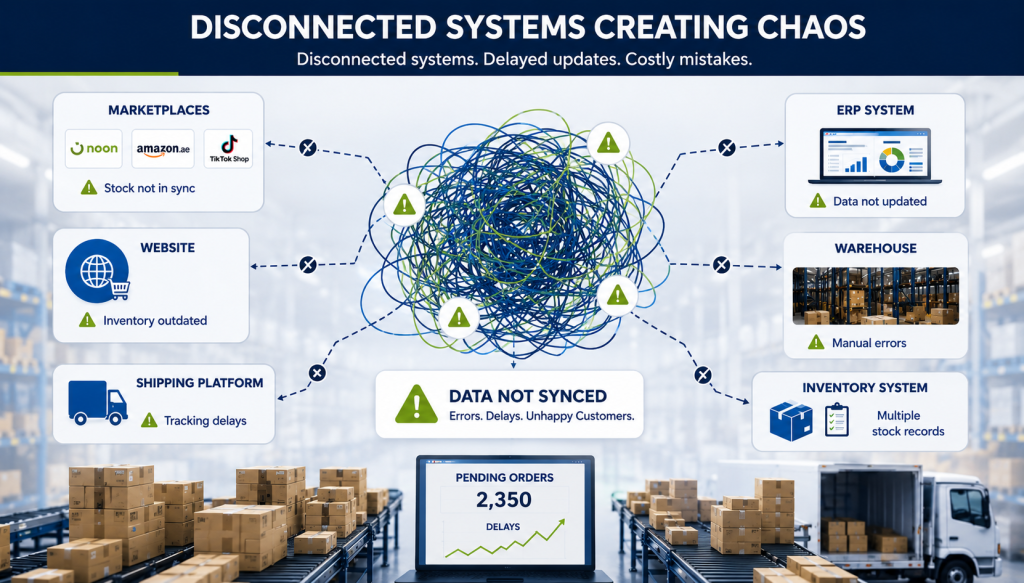
And these issues slowly pile up, leading to fulfillment delays, customer complaints, and more manual work for teams, which becomes more hectic than most businesses expect. And here, you start looking for a WMS ERP system that can help fix these gaps. And ERP and WMS systems fit here. But what exactly is the difference between them? Let’s see!
What’s the Actual Difference Between ERP and WMS?
Here’s the simplest way I can put it:
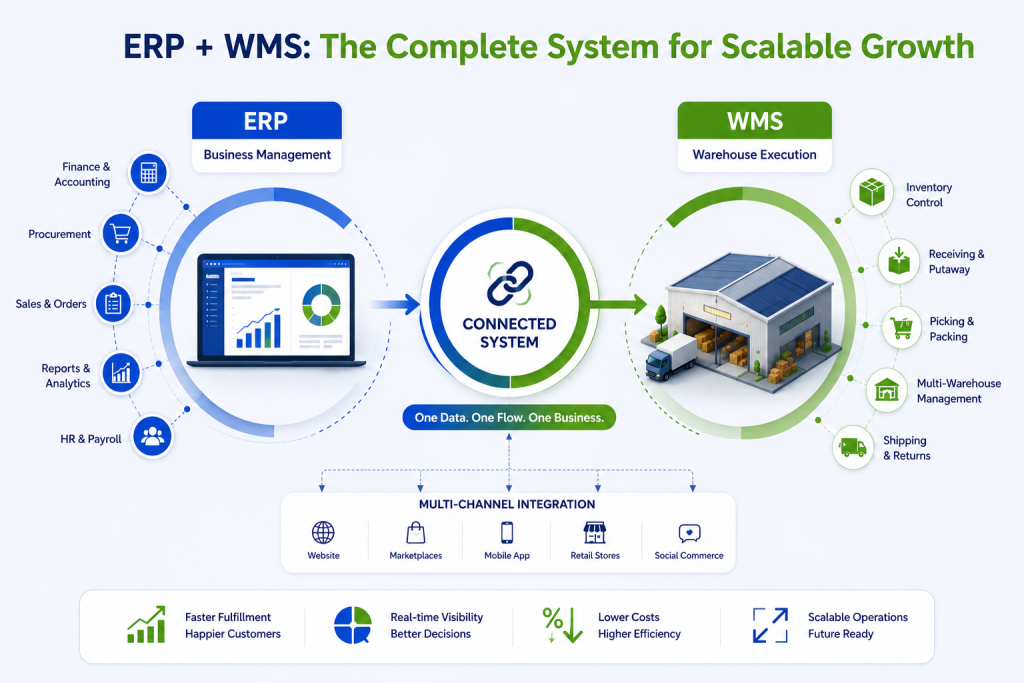
1. ERP (Enterprise Resource Planning): An ERP for warehouse management is the brain of your entire business. It handles finance, procurement, sales, HR, accounting, everything. It gives you a bird’s-eye view of what’s happening across your whole company. If you want to know how much you spent on inventory last quarter, what your margin looks like per SKU, or whether your purchase order is approved, you can use an ERP system for that.
2. WMS (Warehouse Management System): A WMS is the brain of your warehouse floor. It manages everything that happens inside your warehouse, including receiving stock, putting it away, picking, packing, and shipping. It tells your team exactly where a product is (Aisle 3, Rack B, Bin 7), how to pick it in the fastest way, and whether that order has left the building.
So, let’s understand both in a little more detail.
What Does an ERP Actually Do Well?
For businesses that need unified control across departments, an ERP is hard to beat as it offers the following:
1. Financial and Accounting Management
It creates invoicing, UAE VAT compliance, payables, and receivables, all in one place.
2. Procurement and Vendor Management
It helps manage purchase orders, supplier records, and reorder triggers based on demand planning.
3. Cross-department Data Flow
Finance, sales, and operations teams all work from the same data source.
4. HR and Payroll
Especially relevant for larger operations with bigger teams.
5. Scalability Across Business Functions
ERP is modular, so as you add departments or expand into new markets, you can add more modules as needed.
But most brands already have some form of ERP. The problem is that ERP inventory modules were not built for the kind of high-volume, multi-channel warehouse complexity that UAE eCommerce brands deal with today. And here businesses often start looking for WMS ERP integration, where a cloud-based WMS works alongside existing ERP systems.
What Does a WMS System Do That Your ERP Can’t?
Your ERP might tell you, “We have 500 units of SKU X.” But it cannot tell you:
- Which bin are those 500 units stored in
- Whether 120 of them have already been allocated to pending orders
- Whether 30 of them are damaged and should not be picked
- The fastest pick path for your team to fulfill 200 orders before 3 PM
And for brands, it becomes difficult when they are handling Ramadan, White Friday, and other sales. So, here’s what a good WMS handles that an ERP simply was not designed for:
1. Real-time bin and shelf-level inventory
You know exactly where every unit is at any point in time with actual physical location.
2. Intelligent pick routing
The system tells your pickers the most efficient path through the warehouse. Less walking, faster fulfillment, and lower labor costs.
3. Multi-warehouse management
If you have stock in Dubai, Sharjah, and Abu Dhabi (or across the GCC), a WMS keeps everything visible and synchronized.
4. Multi-channel inventory sync
One centralized inventory pool shared across your website, marketplaces, and stores. When a sale happens anywhere, stock updates everywhere.
5. Barcode and scanning-based operations
Reduces human error significantly. No more wrong items being shipped.
6. Returns and reverse logistics
Handles returns, quality checks, and restocking areas where most ERPs struggle.
7. Automated putaway logic
The system decides the best location for incoming inventory based on product type, movement speed, and available space.
8. Wave and batch picking
A WMS can group orders smartly so your team picks multiple orders in one round, reducing fulfillment time significantly.
So, for brands like yours handling 1,000+ orders every day, a cloud-based standalone WMS that integrates with your existing ERP can deliver better results. Now, let’s look at a basic comparison to understand this better.
ERP vs WMS: Quick Side-by-Side
Looking at a WMS ERP comparison side by side makes the differences easier to understand:
| Feature | ERP | Modern WMS (e.g., Unicommerce) |
|---|---|---|
| Core Focus | Entire business management | Inventory, warehouse, and fulfillment |
| Inventory Tracking | Quantity-level | Bin and shelf-level with real-time visibility |
| Multi-Channel Sync | Limited | Yes, live across all channels |
| Pick, Pack, Ship Optimization | No | Yes, with routing and wave picking |
| Multi-Warehouse Visibility | Basic | Full visibility across locations |
| Returns Management | Limited | Yes |
| Marketplace Integrations | Rarely native | 280+ integrations, including Noon and Amazon.ae |
| UAE VAT / Financial Accounting | Yes | Through ERP integration |
| HR and Payroll | Yes | No |
| Implementation Time | 3–12 months | 4–8 weeks (cloud-based) |
| ROI Timeline | Longer, business-wide impact | Typically within 1–2 years |
| Best Used For | Finance, procurement, HR, and overall business management | Operations, fulfillment, and growth |
So, here, the goal of a WMS ERP strategy is to make sure both systems handle the work they were designed for. To create one, let’s see the practical approach.
Do You Need an ERP, a WMS, or a Complete WMS ERP Setup?
This completely depends on where your operations are actually breaking down. Before making a decision, ask these three questions:
1. What’s your biggest pain point right now?
If your challenges are around inventory accuracy, fulfillment speed, channel sync, or warehouse errors. That’s usually a WMS problem.
If your challenges are around financial visibility, procurement chaos, HR, or managing multiple departments, that’s usually an ERP problem.
2. What systems do you already have?
If you’re already using an ERP, you probably don’t need another one. You need a WMS that integrates with it and handles the warehouse capabilities your ERP may be missing.
3. What’s your growth trajectory?
Are you expanding across GCC? Adding new sales channels? Scaling order volumes? A WMS built for that level of growth can take you much further than trying to stretch an ERP’s warehouse module beyond its purpose.
A simple way to decide:
Go with a WMS if:
- You are an eCommerce brand, D2C business, retailer, or marketplace seller
- Fulfillment speed and inventory accuracy matter most
- You want faster implementation and quicker ROI
Go with an ERP if:
- You need stronger finance, accounting, procurement, or HR management
- Your focus is broader business operations
Go with both (WMS and ERP systems) if:
- You need strong business management and warehouse execution together
- You are scaling fast or managing multiple warehouses and channels
At this point, you probably already know whether your challenge is business visibility or warehouse execution. But if inventory accuracy, fulfillment speed, and multi-channel operations are becoming difficult to manage, the next question is: what kind of WMS actually delivers results?
So, it’s Unicommerce offers an ERP warehouse management system that works alongside your existing ERP and helps solve warehouse and fulfillment challenges without requiring you to replace your current systems.
How Unicommerce Fits Into Your Existing ERP Setup?
Unicommerce is a SaaS platform that helps businesses build a connected WMS ERP ecosystem through warehouse management, inventory management, order management, and multi-channel integrations. Instead of asking businesses to replace their existing ERP setup, it works alongside existing systems and helps simplify warehouse and fulfillment operations as brands scale.
Across GCC operations, Unicommerce reports outcomes like:
- 45% faster dispatch
- 99.7% fulfillment rate
- 2× warehouse productivity improvement
- 20–30% lower logistics costs
- 25% faster inventory turnover
Let’s understand which capabilities help businesses achieve these results:
| Unicommerce Capability | How It Helps Businesses |
|---|---|
| Real-Time Inventory Visibility | Provides accurate inventory tracking across warehouses and reduces stock mismatches. |
| Multi-Channel Inventory Sync | Keeps inventory updated across websites, marketplaces, and stores from one place. |
| Barcode-Enabled Warehouse Operations | Reduces manual work and improves picking accuracy. |
| Wave and Batch Picking | Helps process multiple orders together and speeds up fulfillment. |
| Multi-Warehouse Management | Gives complete visibility across multiple warehouse locations. |
| Returns and Reverse Logistics Management | Simplifies return handling and restocking processes. |
| Marketplace Integrations | Connects with channels like Noon, Amazon.ae, and other selling platforms. |
| ERP Integrations | Works with existing ERP systems without replacing them. |
| Cloud-Based Deployment | Enables faster implementation and easier scaling as operations grow. |
As order volume increases, businesses struggle because disconnected systems create more operational complexity. A connected system helps remove those gaps before they start affecting customer experience and fulfillment efficiency.
Wrapping Up
A traditional ERP manages broader business functions, while a modern WMS manages warehouse execution. The best approach is to connect WMS and ERP systems based on your operational needs, warehouse complexity, and growth plans.Fast-growing UAE brands like RSA Global, Vidiwell, and REDTAG improved operations without replacing their entire tech stack. They connected a cloud-based WMS with their existing systems and strengthened the execution layer.
If you’re managing eCommerce or retail operations in the UAE and want to see how Unicommerce WMS can fit into your current setup and WMS ERP ecosystem, book a Demo Now!
FAQS
Q1. What is the main difference between ERP and WMS?
An ERP manages broader business functions like finance, procurement, accounting, HR, and reporting. A WMS focuses on warehouse execution, including inventory tracking, picking, packing, shipping, and fulfillment. Simply put, ERP manages the business side while WMS manages warehouse operations.
Q2. We already have an ERP. Do we still need a WMS?
Yes, if warehouse operations are becoming difficult to manage. Most ERP inventory modules provide quantity-level visibility, but they do not offer real-time warehouse execution features like bin tracking, barcode scanning, pick routing, or multi-channel inventory synchronization.
Q3. Which businesses should choose a WMS over an ERP?
A WMS is usually more suitable for eCommerce brands, omnichannel retailers, D2C brands, and marketplace sellers handling high order volumes. If fulfillment speed, inventory accuracy, and warehouse efficiency are your priorities, a WMS becomes important.
Q4. Can a WMS replace an ERP completely?
No. A WMS handles warehouse and operational functions, while ERP handles financial accounting, procurement, HR, and business reporting. Many growing businesses use a WMS alongside an ERP instead of replacing it.
Q5. At what order volume should a business consider implementing a WMS?
There is no fixed number, but businesses usually start considering a WMS when they process 500–1,000+ orders per month, sell across multiple channels, or begin facing inventory mismatches and fulfillment delays.
Q6. Can a WMS sync inventory across marketplaces like Noon and Amazon.ae?
Yes. A cloud-based WMS can maintain one centralized inventory pool and update stock levels across connected marketplaces, websites, and stores in real time, reducing overselling and inventory discrepancies.
Q7. Is cloud-based WMS better than on-premise WMS?
For most growing UAE businesses, cloud-based WMS is usually preferred because it requires less IT infrastructure, deploys faster, and scales more easily across warehouses and regions.
Q8. How long does WMS implementation usually take?
Cloud-based WMS platforms typically go live within 4–8 weeks, depending on integrations and business complexity. ERP implementations usually take significantly longer.
Q9. What kind of ROI can businesses expect from a WMS?
Businesses commonly see ROI through reduced picking errors, lower manual effort, faster fulfillment, improved inventory accuracy, and fewer order cancellations due to stock mismatches.
Q10. Can ERP and WMS work together?
Yes. ERP and WMS are commonly integrated. ERP handles business-level data like purchase orders and finance, while WMS handles warehouse activities and sends real-time updates back into the ERP system.